
AI as the Investigation Committee’s Assistant: From a Cloud Agent to Offline Incident Investigation
How we moved from our first cloud experiments to an operational “masking tool → AI agent → unmasking” workflow, then built a test offline investigation system, and are now preparing for the next step: Fire, a secure corporate AI environment.
The key idea: AI should not “assign blame”, and it does not replace the committee. Its useful role is to help the committee pull scattered materials together into a single picture faster, spot gaps, test the causal logic and prepare a first working draft of the investigation.
Where it all began
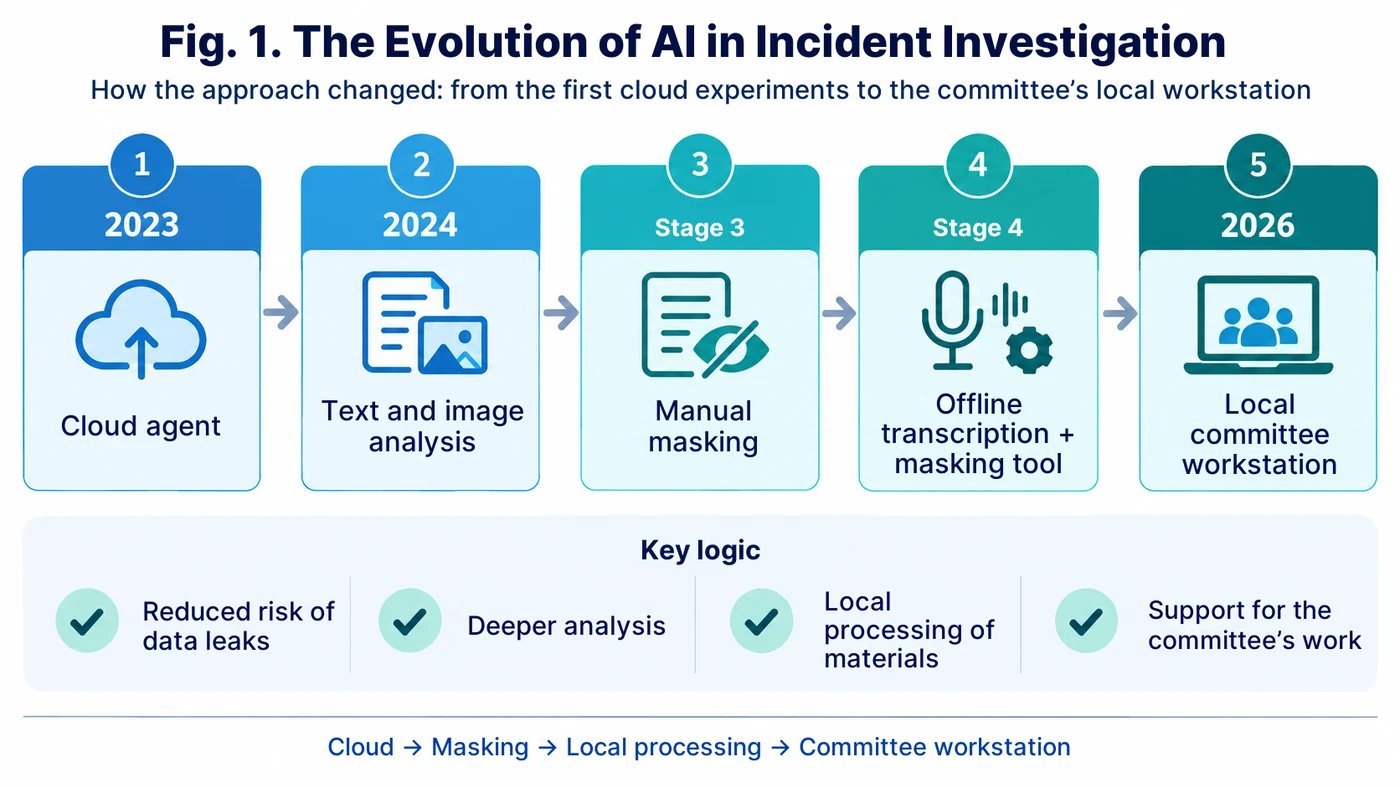
We made our first attempts to use AI in incident investigation back in 2023. At the time, the idea itself looked fairly simple: create our own agent, load the investigation methodology and the materials of a specific event into it, and then ask it to build a timeline, find contradictions in the written statements, and suggest causes and actions.
In 2024 the models’ capabilities expanded noticeably: they began to work confidently not only with text but also with images. One of our early experiments was not a full investigation at all. At a remote site, a female worker fell and injured her leg. An X-ray was taken on site, but there was no specialist there who could read it straight away. We uploaded the image to an AI, and the model pointed to an area that looked like a fracture of the fifth metatarsal.
I want to stress this: it was not a medical diagnosis, nor should it ever be. The final interpretation of a medical image is a job for a doctor. But for us that episode was an important technical signal: the model is capable of noticing details in an image that a non-specialist might miss. That means that in an investigation it could potentially work not only with text but also with diagrams, photographs and other materials.
The first working version: a cloud agent
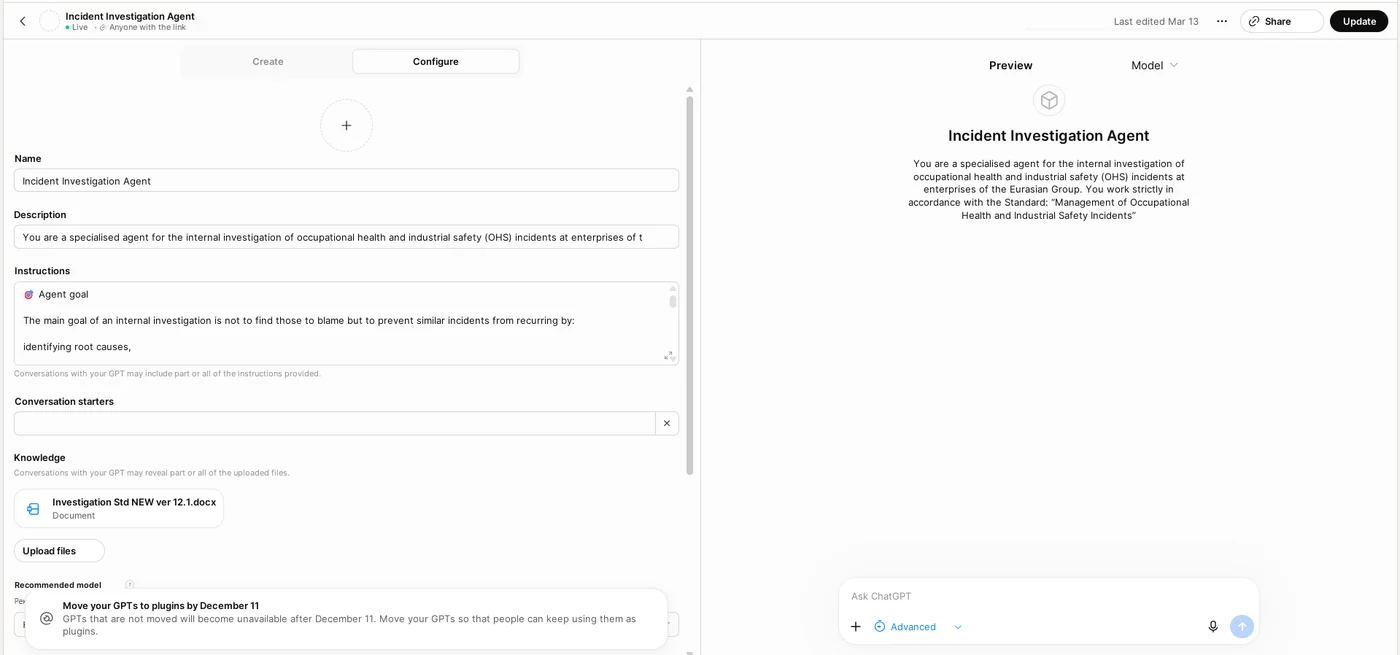
When more robust custom agents appeared, we began configuring them specifically around our corporate methodology. We built versions in GPT, Gemini and Perplexity; early on we also tried Grok. The methodology was loaded into the agent, followed by the written statements, the initial description of the event, individual documents and other materials.
The practical effect was obvious straight away. The AI quickly collated testimony, proposed a sequence of events, found discrepancies in timings and wording, and drew up a list of additional questions. For the committee it was useful as a “second analyst” that never tires of rereading dozens of pages.
But the first version had an obvious flaw: we were effectively handing real investigation materials over to an external service. With incidents this is especially sensitive: the materials may contain full names, job titles, medical information, written statements, photographs and the company’s internal information.
The more we used the tool, the clearer it became that convenience cannot justify sending unnecessary data outside.
See the prompt appendix: Prompt 1 — a safe version of the cloud agent for working only with materials that have been anonymised in advance.
The methodology became stricter — and that changed what we needed from AI
At the same time, the corporate internal investigation methodology itself was evolving. For me this is a crucial point: AI must not be given the right to “work out for itself how to investigate”. The methodology has to come first, and only then is a digital tool built around it.
Under the current methodology, the committee’s main goal is not to find someone to blame but to develop the most effective measures possible to eliminate or reduce the likelihood of a similar event happening again. If there is a human action in the chain, the committee has to go further and establish why that action became possible or acceptable.
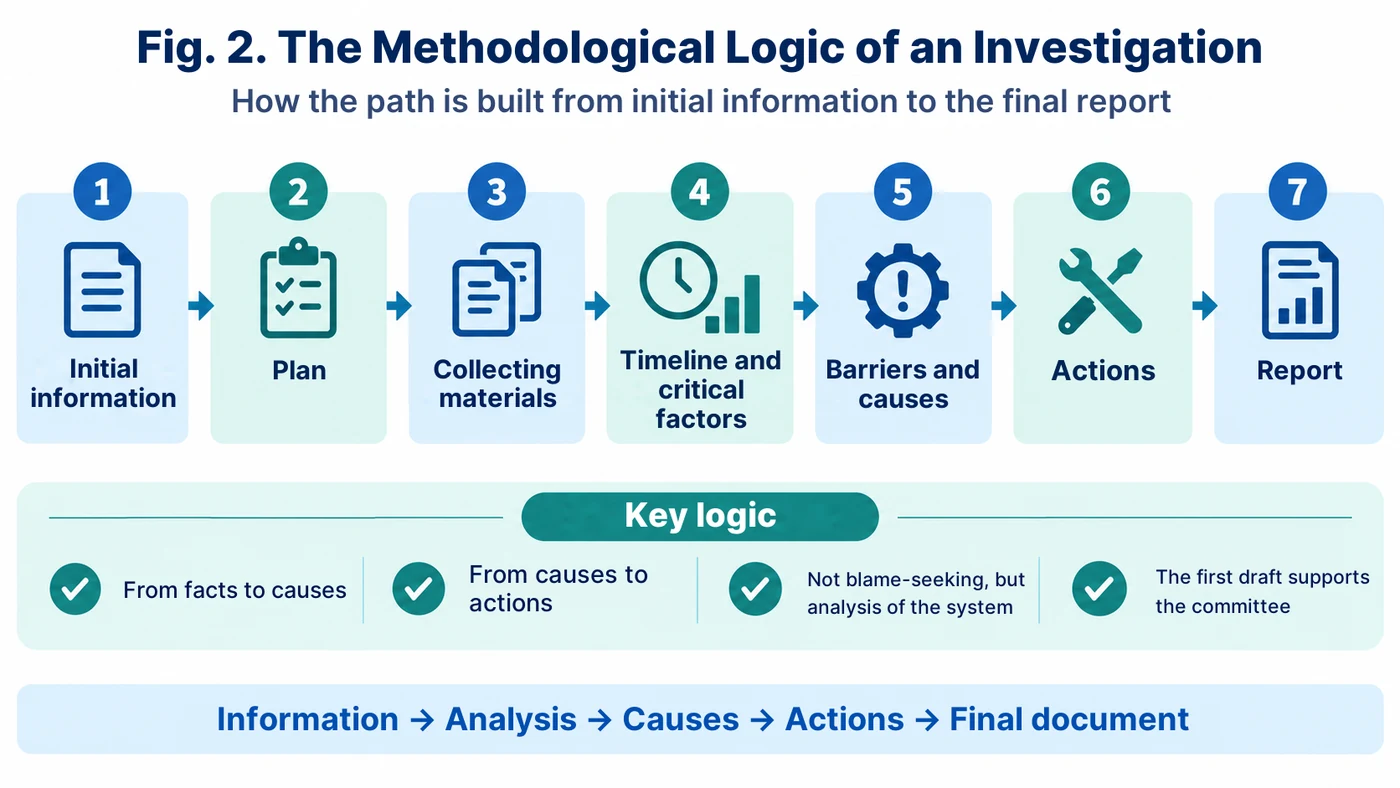
The investigation is built on the logic of protective barriers: hazard source → undesired event → consequences, with preventive and mitigating barriers examined separately. At the information analysis stage, a timeline is built and critical factors are identified. Next comes the cause tree, which should lead from the immediate and intermediate causes to the systemic root causes.
In simpler reviews, the chain of “Why?” questions can be short. In a complex event it branches out and turns into a full cause tree. The bow-tie barrier logic helps to examine separately why the event happened at all and why the consequences turned out the way they did.
It was this sequence that later became the framework of our local application.
See Prompts 2–6: timeline and critical factors → questions and contradictions → barriers → cause tree → actions.
The second version: masking by hand
The next stage was much safer, though rather inconvenient. Before uploading materials to the cloud agent, we manually replaced surnames and other sensitive values: “Worker 1”, “Worker 2”, “Manager 1”, “Department 1” and so on.
From a confidentiality standpoint this was already a step forward. The agent could see the logic of the incident but not the real names. Once the analysis was complete, the placeholders had to be swapped back by hand — often using Ctrl+F.
With two or three people involved, this process is bearable. When an investigation involves many written statements, witnesses, documents and recurring surnames, manual masking and restoration turn into a job in their own right and create a risk of error.
The third version: a local masking tool, and the separate problem of audio
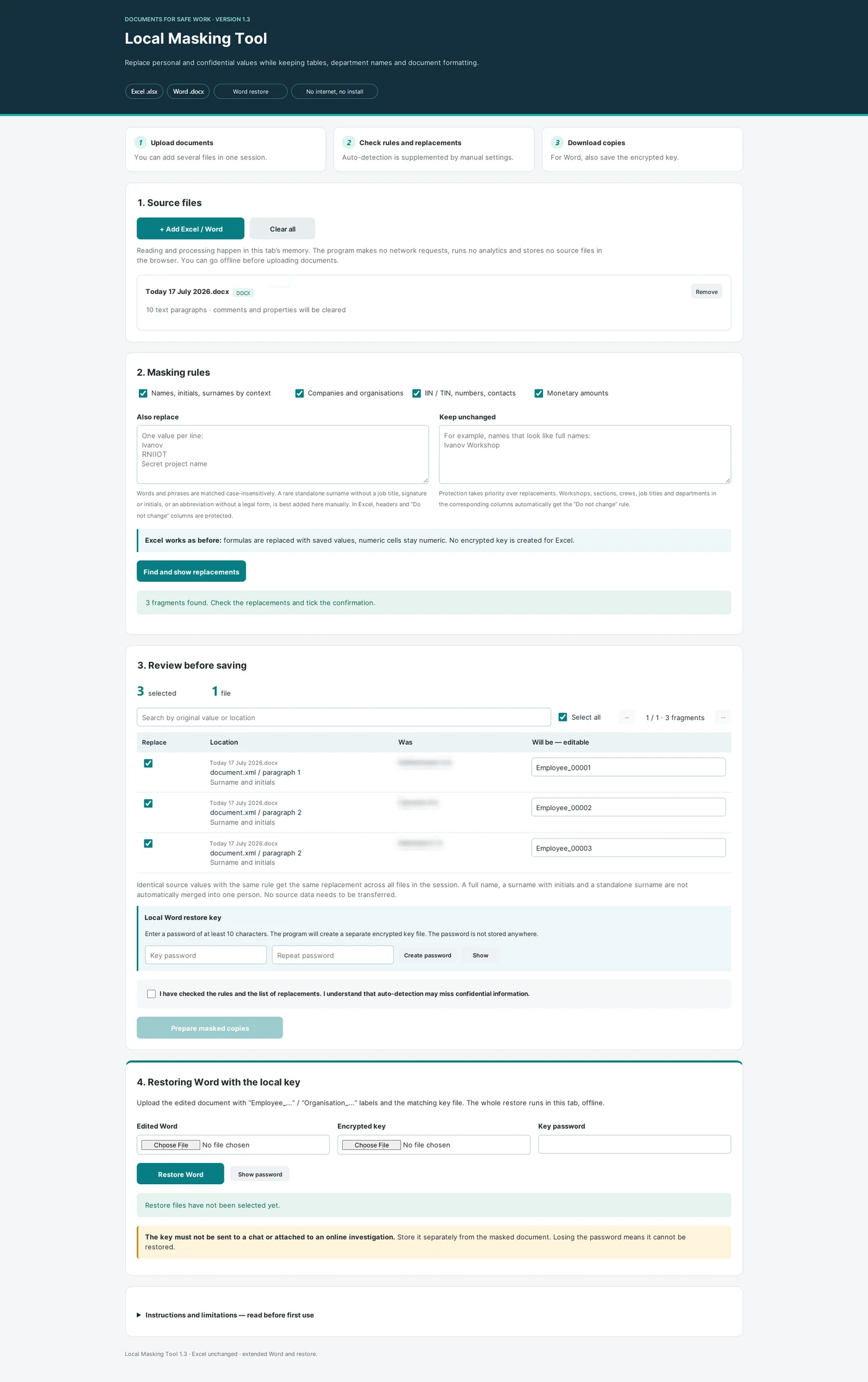
Once we had picked up vibe coding skills, we replaced the manual operation with a local masking tool, which I wrote about in the first article of this series. A Word document is processed on the computer and given placeholder labels, while an unmasking key is saved separately. The key is password-protected and is never passed to the agent.
After that, only masked written statements and other materials can be sent to the cloud AI. The output comes back to the computer and is restored locally. This is the workflow we actually use today: local masking tool → configured investigation agent → local unmasking. It already lets us use the strengths of a cloud model without giving it the original names or the restoration key.
But one more vulnerable element remained: audio recordings. It is convenient to record statements and interviews as audio, but before they can be analysed they first have to be turned into text. We used to rely on separate online services and mobile apps for this. Later, transcription became available directly in the major AI services. That is convenient, but the original recording of a person’s voice still goes outside.
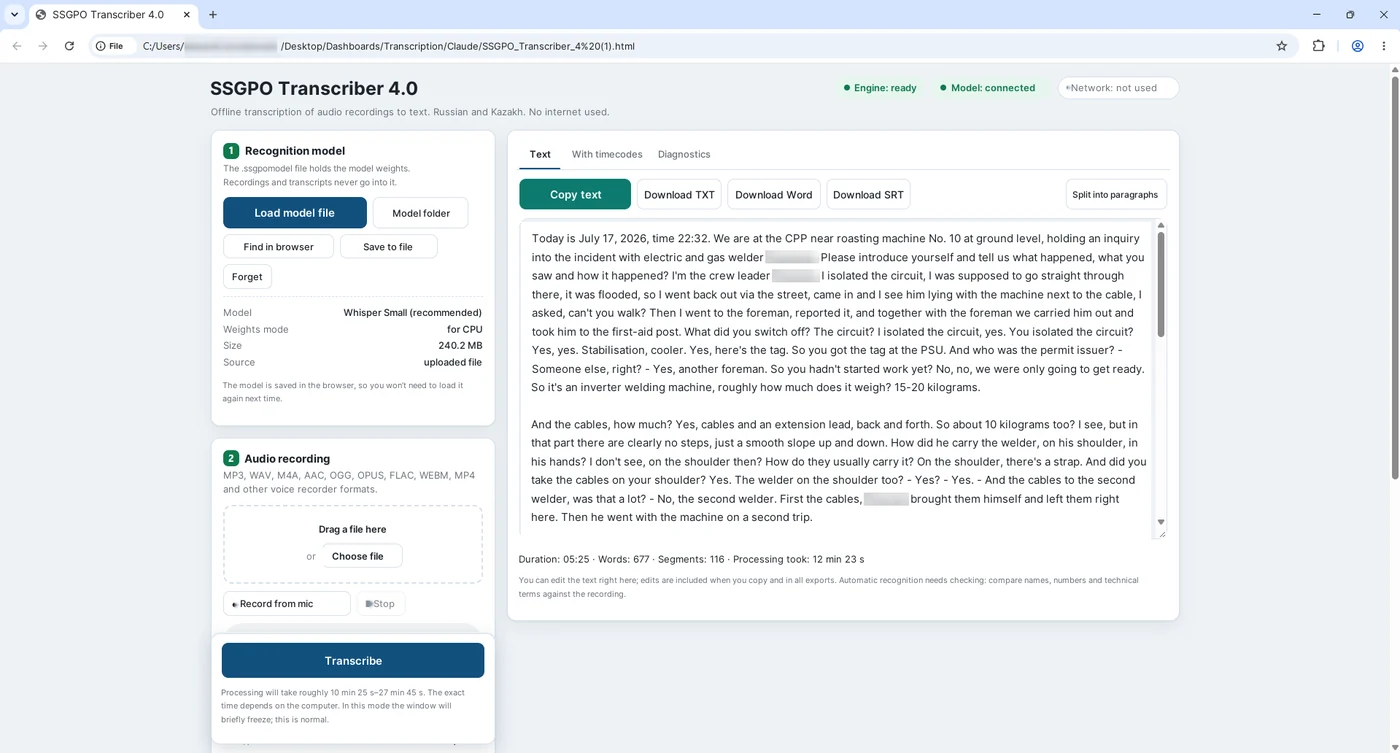
So we built another tool: a local transcriber. It runs Whisper directly on the computer. In our trials, transcription quality proved quite comparable to the familiar cloud options, while the original audio recording never leaves the computer. After local transcription, the text can be masked and only then, if necessary, passed to the working investigation agent.
The chain at this stage: local transcription → local masking tool → cloud agent. For analysing the materials, see Prompts 1–6.
The fourth version: the offline system is already built — now we are testing it
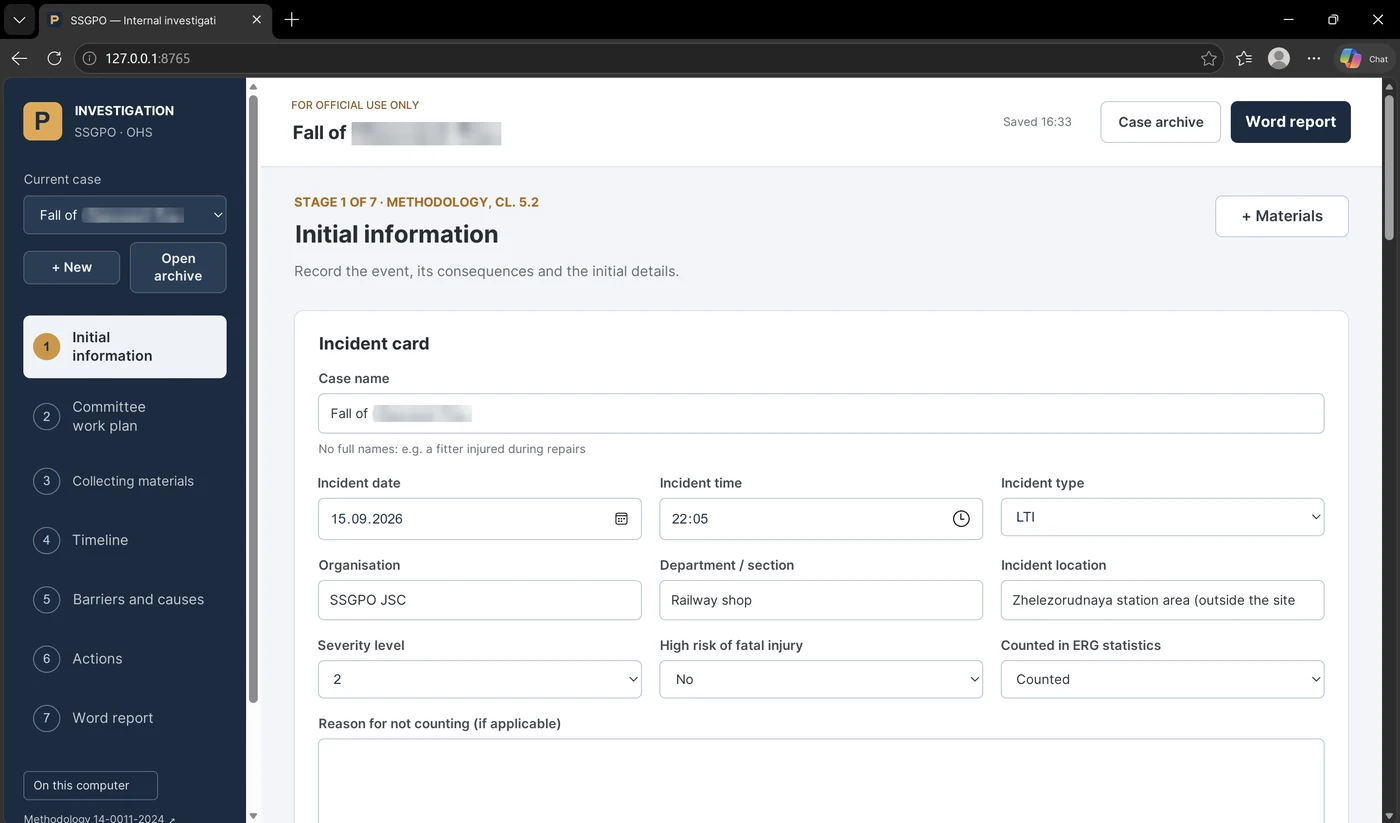
At this point a different question arose. If transcription, document reading and the model could already work locally, why not bring it all together in one secure environment? That is how the experimental offline investigation system was born. It has already been developed and it works, but for now we deliberately treat it as a test system: we are trying it out on training and anonymised cases, comparing its output with the committee’s work and looking for the next iterations that will make the process faster, more convenient and more robust.
The goal was this: to create a single workspace for the committee where you can upload the methodological guide, initial information, written statements, Word and PDF files, audio recordings, photographs and diagrams; transcribe speech and extract text from documents locally; work through the stages of the methodology; and get an editable first draft of the report in Word.
It only sounds simple when put in a single sentence. In practice there were countless iterations. Local speech recognition did not work straight away; then we had to deal with scanned PDFs, images, large volumes of material, the local model, the timeline, the causes and the final document. The development routine was the same as in our other projects: one change → run → result or screenshot of the error → next iteration with ChatGPT.
The result is a local system with a browser interface and its own local AI environment. It already transcribes recordings well, reads prepared materials and generates a structured draft of the investigation. Our task now is not to declare it a “finished product” but to test it calmly, compare the results and improve the working logic. A reasonably powerful computer helps when running a full-scale local model and processing large volumes of material quickly.
See Prompt 8 — a master prompt for vibe coding a local workspace for the committee.
What the offline test version can already do
In the offline test version, the whole cycle is already built around the methodology rather than around an ordinary AI chat.
First, the committee records the initial information: what happened, the hazard source, the undesired event, the consequences, the people involved and the findings of the site inspection. Next, a plan is drawn up: which questions need to be answered, who needs to be interviewed, and which documents and expert examinations need to be obtained.
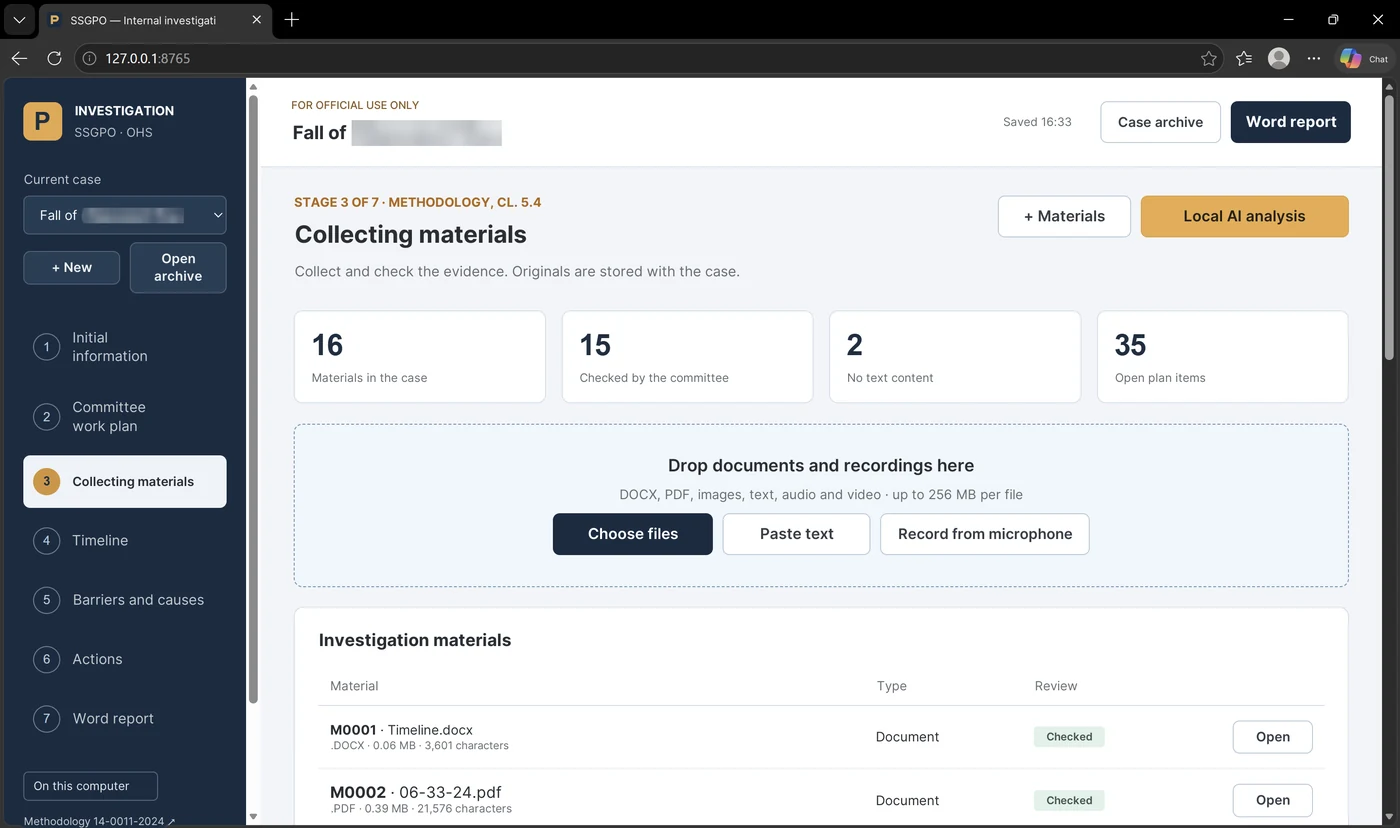
DOCX files and text-based PDFs can be uploaded to the materials section. Scans and photographs can be recognised locally; diagrams and images are kept in the case file, and the model can suggest a description of the visible details. Audio and video are transcribed locally. You can also record an interview directly from the microphone and then get a transcript.
Once the materials have been checked, the application helps to build the timeline. The AI suggests events and quotations, but the decision on whether to include an entry is made by the committee. Critical factors are flagged separately.
The next block covers protective barriers and causes. The committee examines the preventive and mitigating barriers and builds two initial branches: why the undesired event happened and why the consequences were what they were. Causes proposed by the AI remain hypotheses until the committee confirms them.
Once the causes are established, actions are drawn up: which cause each measure addresses, who is responsible, the deadline, what verifiable result can be expected, whether a temporary barrier is needed, and whether the measure should be rolled out beyond a single area.
Only then is the draft report produced. The application can assemble a first Word draft following the structure of the methodological guide, including the timeline, the cause tree, the barriers, the register of materials and the appendices.
See Prompt 2 — timeline; Prompt 3 — contradictions and missing data; Prompt 4 — barriers; Prompt 5 — cause tree; Prompt 6 — actions; Prompt 7 — draft final report.
What the local AI does — and what it must not do
It is important not to overestimate automation here. The AI reads verified texts in chunks and proposes a timeline, questions, barriers, causal hypotheses and possible actions. It can find a contradiction between two written statements or notice that an important period is missing from the timeline.
But a quotation from a document only confirms that those words really do appear in the material. It does not prove that the testimony is true. Recognised text may contain errors. A diagram may be misinterpreted. A causal link may turn out to be nothing more than a hypothesis.
That is why the application is built on a simple principle: the AI proposes — the committee accepts, rejects or edits. A cause never becomes confirmed automatically. Responsible persons and deadlines are not assigned by the model. The Word draft is exactly that — a first working draft, not a “just sign it” document.
This matters all the more because the internal report does not replace the documents required by law and established procedures. Responsibility for the investigation remains with the committee.
See Prompt 9 — checking quality, confidentiality and the limits of automation before the output is used.
Confidentiality became part of the architecture, not a separate instruction
In investigations, confidentiality cannot be left “for later”. The methodology itself classifies internal investigation materials as documents for official use only and explicitly requires personal data to be protected when files are created and transferred.
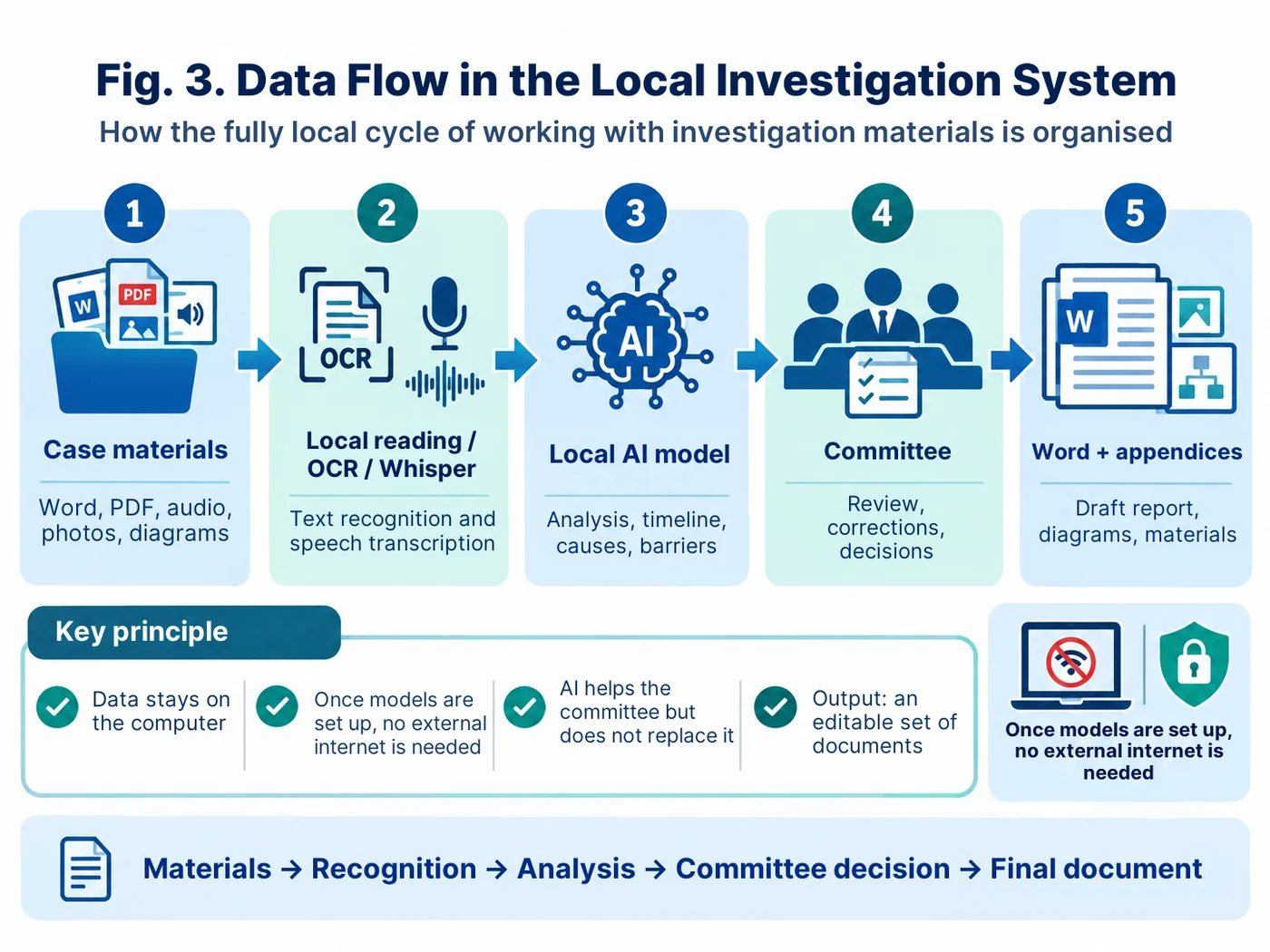
In the offline test version, the case materials, transcripts, analysis results and Word files stay on the computer. The local model runs via a loopback address, and once the required models have been prepared, a working session on a case can be carried out without any connection to the external internet.
But there is no magic here either. Working locally does not mean automatic anonymisation. If you load full names and medical information into a case, they will remain on that computer and in the case appendices. That is why the usual information security measures are still needed: a protected user account, access rights, storage rules, backups and, where necessary, additional masking.
In other words, our evolution did not end with the slogan “everything offline means everything is safe”. It would be more accurate to put it this way: we have eliminated the unnecessary transfer of materials outside and kept control over the data where it belongs — inside the company.
What we use today
Today we effectively have two workflows. The first is operational: we mask the materials locally, pass an anonymised copy to the configured investigation agent, and then unmask the output locally. This is the setup that can already be used in real work.
The second is a test workflow: a fully offline system that transcribes audio locally on its own, reads the materials, helps to build the timeline, barriers and causes, and produces a first draft of the report. It already works, but we are continuing to test and improve it. For us this is a matter of principle: a pilot must not be passed off as a mature production system just because it looks good.
Operational workflow: masking tool → configured AI investigation agent → unmasking.
Test workflow: a fully local workspace for the committee → testing and further iterations.
The next step: Fire, a secure corporate AI
Meanwhile, the Group’s IT department is developing Fire, an internal AI, within the Collab corporate environment. For us this is the logical next stage: moving the methodological logic of the committee’s assistant into a secure, server-based corporate environment, where there is no need to choose between the power of a large model and confidentiality requirements.
We see Fire not as an “automatic investigator” but as another environment for the same principle: the materials stay inside a secure infrastructure, the AI helps the committee analyse the timeline, barriers, contradictions and causes, and decisions are still made by people.
Before migrating, we first need to check Fire’s technical capabilities: handling documents and audio, context size, access control, logging, data storage and exporting results. In other words, here too we start from the methodology and information security, not from a desire to use the latest new model at any cost.
Watch the video: the full cycle of a local investigation
In this article I deliberately avoid overloading the text with dozens of near-identical screenshots. A three-minute screen recording does a better job of showing how the elements connect and what the person actually does as opposed to what the software does.
Screenshots are needed where we have to pause on the architecture: types of materials, the timeline, causes, actions and the final Word document. The rest of the mechanics are better seen in the video — you will find it at the end of the article.
Where the time savings come from
Investigating an incident still requires people: to inspect the scene, interview those involved, obtain documents, discuss the facts and make decisions. The essence of the committee’s work cannot be automated.
But a significant share of the paperwork can be taken away: retyping audio, collating written statements, manually searching for timing discrepancies, transferring quotations into the timeline, the initial mapping of barriers, formatting the cause tree, preparing a draft list of measures and assembling the first draft of the report.
And for me the main benefit here is not about reducing the number of specialists. Quite the opposite: if specialists spend less time on mechanical paperwork, they have more time for what an investigation is actually for — talking to people, working on site, checking barriers and helping managers prevent the event from happening again.
What we ended up with
Over several years the path has been a telling one: open cloud agent → manual masking → local masking tool and unmasking → local transcription → test offline system → next step into the secure corporate Fire.
That said, today’s working tool is not the experimental offline version but the proven masking workflow: the original materials stay with us, an anonymised version goes to the agent, and restoration is done locally. We are currently testing the offline system and steadily refining it.
The most important change is not even a technical one. We stopped asking AI “who is to blame?” and started asking a different question: “what data is missing, which barriers failed, why did they fail, and which measures will genuinely reduce the risk of recurrence?”
This is the role in which AI is useful in an investigation: not a judge and not the chair of the committee, but a fast second analyst that helps people work with the facts in greater depth.
One more thing: we must not forget about natural intelligence
The more powerful models become, the more important it is not to hand our own thinking over to them. Artificial intelligence is useful when it strengthens natural intelligence: it helps us see connections faster, test a hypothesis, put together a draft and free up time for talking to people and working on site.
That is why, for me, the right path is to be not just users of ready-made buttons but creators of new solutions: to understand the methodology, define the architecture, check the output, fix errors and grow stronger ourselves along with the tool.
We should use AI, but we need to apply and develop our own natural intelligence just as much. And if this combination helps us investigate events more deeply, learn from them better and prevent them from happening again, then the technology is truly working for the good of safety.
Prompts for the article
Operational masking workflow → test offline system → next step into the secure corporate Fire
Current status: in real work we use the “local masking tool → configured cloud agent → local unmasking” workflow. A fully offline system has already been developed but is still being tested and improved. Fire is seen as the next, secure corporate stage.
Prompt 1. The current working agent: anonymised materials only
Link to the article: the sections “The third version” and “What we use today”. This is the operational workflow in use after local masking.
You are an analytical assistant to a committee conducting an internal investigation into an occupational health and industrial safety (OHS) incident.

WORKFLOW:
The source documents are first masked locally. You receive only anonymised copies. After you have finished, the output is unmasked locally using a separate key and password that you do not have.

IMPORTANT:
- work only with materials that have been anonymised in advance;
- do not try to restore full names, departments, addresses or other hidden values;
- do not use the internet or external facts unless they are provided separately;
- do not identify who is to blame;
- do not present a hypothesis as an established fact;
- do not substitute for the committee’s decision.

Goal: to help the committee structure the materials and check that the investigation is complete.

For every conclusion, distinguish between:
FACT — directly confirmed by the material;
ASSUMPTION — a reasonable assumption;
CONFLICT — a contradiction between materials;
GAP — missing information;
QUESTION — a question that needs to be resolved;
HYPOTHESIS — a possible cause that requires confirmation.

Procedure:
1. Draw up a register of the materials received.
2. Extract only verifiable facts, citing the source.
3. Build a preliminary timeline.
4. Show contradictions and gaps.
5. Formulate additional questions for the committee.
6. Once the timeline has been confirmed, propose a barrier analysis.
7. Formulate causes only as hypotheses until the committee decides.
8. Link actions only to confirmed causes.

In all tables, cite the source: the material number, the document/file and a short quotation or the exact place on which the conclusion is based.
Prompt 2. Timeline of events and critical factors
Link to the article: the section on the timeline in the working agent and the offline test system.
I am providing verified texts of the incident materials.

Produce a DRAFT timeline.

Rules:
1. Do not add events that are not in the materials.
2. If the time is exact, state it as exact.
3. If the time is approximate, mark it “approximately”.
4. If two sources give a different time or sequence, do not silently pick one version; flag it as CONFLICT.
5. For each row, state: date/time; event or condition; source; status FACT / ASSUMPTION / CONFLICT; why it matters.
6. Separately, propose a list of critical factors: events/conditions without which the undesired event or the severity of the consequences would probably have been different.
7. Do not treat critical factors as approved until the committee decides.

At the end, provide:
A. the draft timeline;
B. a list of contradictions;
C. a list of missing data;
D. draft critical factors for discussion by the committee.
Prompt 3. Contradictions, gaps and a plan for follow-up interviews
Link to the article: the sections on planning, collecting materials and the role of AI as a second analyst.
Based on the materials and the draft timeline, prepare a worksheet for the committee.

You need to:
1. Find contradictions between written statements, documents, timings and technical data.
2. Not treat differences in wording as lies without evidence.
3. For each contradiction, state: source A; source B; what exactly differs; what needs to be checked.
4. Draw up questions for a follow-up interview.
5. The questions must be open and neutral, without leading the answer.
6. Separately, draw up a list of documents, measurements, expert examinations, photos or diagrams that could close the gap.
7. Mark which questions are critical for establishing the circumstances, protective barriers, causes and severity of the consequences.

Do not conclude that testimony is unreliable merely because a contradiction exists.
Prompt 4. Barrier logic and the bow-tie
Link to the article: the section on barrier logic and the transition to causes.
Use the timeline and critical factors confirmed by the committee.

Produce a DRAFT barrier analysis.

1. Hazard source(s).
2. Undesired event.
3. Consequences.
4. Preventive barriers: which barrier should have prevented the event/contact; did it exist; was it available; was it applied; did it work; source of confirmation.
5. Mitigating barriers: which barrier should have prevented the consequences or reduced their severity; did it exist; did it work; source of confirmation.
6. For each missing or ineffective barrier, formulate a “Why?” question.

Do not automatically call the absence of a barrier a root cause.
Do not invent barriers that are not in the methodology, the documents or the process logic without marking them HYPOTHESIS.

The output is a table for discussion by the committee, not an approved conclusion.
Prompt 5. The cause tree and root causes
Link to the article: the section “The methodology became stricter” and the causes block.
Input:
- the confirmed timeline;
- critical factors;
- the barrier analysis;
- the committee’s decisions on confirmed facts.

Build a DRAFT cause tree.

Starting point: “Undesired event + consequences”.
The first two branches:
A. Why did the undesired event happen?
B. Why did these consequences occur / why was their severity what it was?

Then:
1. For each node, ask “Why?” as many times as necessary to reach a systemic cause.
2. Link each cause to its parent question.
3. Every critical factor must be reflected in the tree or separately explained as excluded.
4. Do not accept a human action/error as a root cause. Continue the analysis: why was the action possible or considered acceptable?
5. Propose a root cause only if it describes a specific process/system deficiency; can be eliminated; lies within the control of the company/the Group; and allows a specific measure to be proposed.
6. Generic wording without further explanation is prohibited: “poor culture”, “personal carelessness”, “bad organisation”, “training shortcomings”.

For each node:
- wording;
- type: immediate / intermediate / root cause candidate;
- supporting sources;
- related critical factors;
- status FACT / HYPOTHESIS / CONFIRMED_BY_COMMISSION.

Do not confirm a root cause on behalf of the committee.
Prompt 6. Corrective and preventive actions
Link to the article: the section on actions and on saving time when preparing the first draft.
Use only the causes that the committee has decided to include in the list for developing measures.

For each cause, propose 2–4 possible actions.

For each option, state:
- which specific cause it eliminates or which barrier it strengthens;
- type: technical / organisational / training / monitoring / other;
- the expected verifiable result;
- how to check its effectiveness;
- scope: location of the event / similar facilities / the company / the Group;
- whether a temporary protective measure is needed until the permanent one is in place;
- possible side risks;
- what data is needed to set the deadline and the responsible person.

Do not fill in the name of the responsible person or a specific deadline without a decision by the committee.
Do not propose an action such as “hold an unscheduled safety briefing” as a one-size-fits-all solution if it does not eliminate the established cause.
Separately, flag actions that only tighten control but do not eliminate the root cause.
Prompt 7. Draft final report following the methodology
Link to the article: the section on generating the Word document and the “first draft, not a document for signature” principle.
Prepare a DRAFT text of the internal report based only on elements approved by the committee.

Use:
- the incident card;
- the confirmed timeline;
- the list of critical factors;
- the approved barrier analysis;
- the final cause tree;
- the approved list of causes;
- the agreed actions;
- the register of materials.

Do not include in the final text, as fact, unconfirmed hypotheses, disputed versions without a flag, or conclusions without a source.

Structure:
1. Summary and circumstances.
2. Materials and information-gathering methods.
3. Timeline.
4. Critical factors.
5. Protective barriers.
6. Cause analysis.
7. Root causes.
8. Corrective and preventive actions.
9. Appendices / register of materials.

Wherever possible, keep a reference to the source material next to each significant conclusion.
At the top of the document, add the mark: “DRAFT. Subject to review and approval by the committee”.
Do not formulate any conclusion on guilt.
Prompt 8. Master prompt for the offline test system
Link to the article: the section “The offline system is already built — now we are testing it”.
I am not a programmer. Help me build a TEST local application for internal incident investigation based on our corporate methodology. The goal of this stage is a pilot and quality testing, not automatic commissioning into production use.

Work step by step. At each step:
1. explain what we are doing and why;
2. give one action or one ready-made file/patch;
3. wait for my result or screenshot;
4. check it;
5. only then move on.

TARGET ARCHITECTURE
- Windows 10/11;
- a local backend on 127.0.0.1 and a browser interface;
- after a one-off preparation of the models, work with case materials without the external internet;
- design for a powerful workstation; for a weaker machine, suggest a lighter model but do not hide the drop in quality/speed;
- local storage of cases;
- a case archive with checksums;
- version history;
- no mandatory sending of materials to external APIs.

MATERIALS
- DOCX: paragraphs, tables, headers and footers;
- PDF with text;
- scanned PDFs / images — local recognition;
- diagrams / photographs — keep the original and offer a description only as a draft;
- audio / video — local transcription;
- microphone recording;
- manual input and editing;
- a mandatory “checked against the original” mark before the text is used in AI analysis.

LOCAL MODELS
- LLM via a local engine (for example, Ollama);
- the multilingual Whisper speech model;
- a local vision model if necessary;
- the application must not silently download models during an investigation.

METHODOLOGY / STAGES
1. Initial information.
2. Committee plan.
3. Collection of materials.
4. Timeline and critical factors.
5. Barriers and causes.
6. Actions.
7. Report.

AI RULES
- The AI only makes suggestions.
- Every conclusion keeps its source and quotation.
- Distinguish FACT / ASSUMPTION / CONFLICT / GAP / HYPOTHESIS.
- Causes remain hypotheses until confirmed by the committee.
- The model does not assign responsible persons or deadlines on its own.
- The committee must be able to accept, reject or edit every suggestion.
- The final Word document is an editable draft.
- The report must include the cause tree, barriers, register and appendices.

SECURITY
- no CDN and no external telemetry;
- investigation network requests via loopback only;
- make it clear to the user that working locally does not equal automatic anonymisation;
- do not store secrets in open client-side code;
- provide for case deletion, backup and transfer.

Start with the directory architecture, the case data format and the threat model. Do not write any code until I confirm.

PILOT STATUS
- clearly label the version as “TEST / PILOT”;
- add a set of benchmark training cases;
- for each case, compare the AI output with the conclusions of the person/committee;
- keep a log of defects found and iterations;
- do not call the system ready for production use until testing is complete.
Prompt 9. Audit of the offline pilot system
Link to the article: the sections on the limits of automation, confidentiality and the current test status.
Audit the finished application and the draft investigation before handing them over to the committee.

CHECK TECHNICALLY
1. Are there any external network requests while working on a case?
2. Are CDNs, external fonts, cloud speech-to-text or external APIs used?
3. Where are the source files, transcripts, local models and backups stored?
4. What happens when a case is deleted?
5. Do source documents end up in diagnostic logs?
6. Is case content uploaded anywhere when an error occurs?

CHECK METHODOLOGICALLY
7. Do all significant conclusions have a source?
8. Are facts separated from hypotheses?
9. Are all critical factors reflected in the cause analysis?
10. Have human actions been named as a root cause without analysing the systemic conditions?
11. Are actions linked to specific causes/barriers?
12. Has the model assigned responsible persons and deadlines without a decision by the committee?
13. Is the draft report presented as an approved document?

CHECK CONFIDENTIALITY
14. What personal/medical data is held in the local case file?
15. Is additional masking required for demonstration, publication or transfer?
16. Do file names and screenshots contain unnecessary full names?

Present the result as a table:
Check | Status | Risk identified | What to fix | Who must confirm.

Do not automatically correct the substantive conclusions of the investigation.

CHECK MATURITY STATUS
17. Is there a set of benchmark cases and comparison results?
18. Which functions are already stable and which remain experimental?
19. Which errors/limitations must be eliminated before production use?
20. Does the interface create the false impression that the AI output is the committee’s decision?
How to use the prompts
- Prompt 1 — today’s operational workflow: only materials anonymised in advance; the unmasking key is never passed to the agent.
- Prompts 2–7 — methodological working blocks that can be used both in the current agent and in a future local or server-based environment.
- Prompt 8 — building and further refining the fully offline test system.
- Prompt 9 — auditing the pilot before expanding its use.
The core principle of the series remains the same: first we protect the data and define the methodology, then we automate. AI strengthens the committee’s work but does not replace professional thinking, fact-checking and human responsibility.