
AI as a second expert: from safety talks to automated BSD evaluation
Safety talks → digital assessment → Make → automated behavioural safety dialogues
Main idea: AI does not replace the manager or safety specialist. It becomes a single "second expert" who applies the exact same criteria, gives personal feedback and allows scaling quality control to hundreds and thousands of real conversations.
Why we actually started assessing the conversation instead of the fact it took place
In occupational health and industrial safety, it is easy to count the fact: a safety talk was held, a behavioural safety dialogue was registered, a card was filled out. It is much harder to answer the question of how well the manager actually conducted the conversation and whether they achieved the goal.
A safety talk in our methodology is a mandatory part of the pre-shift meeting lasting 5–10 minutes. The manager must consider one specific relevant topic and build a clear connection: hazard → consequences → safety measures. At the same time, not only the foreman's monologue is important, but also the dialogue with the workers: questions, answers and involvement in the discussion.
Therefore, the initial task was not to "check for the presence of a record", but rather: is it possible to teach AI to equally assess the real quality of such conversations and give the manager specific feedback?
Stage 1. First the methodology, then artificial intelligence
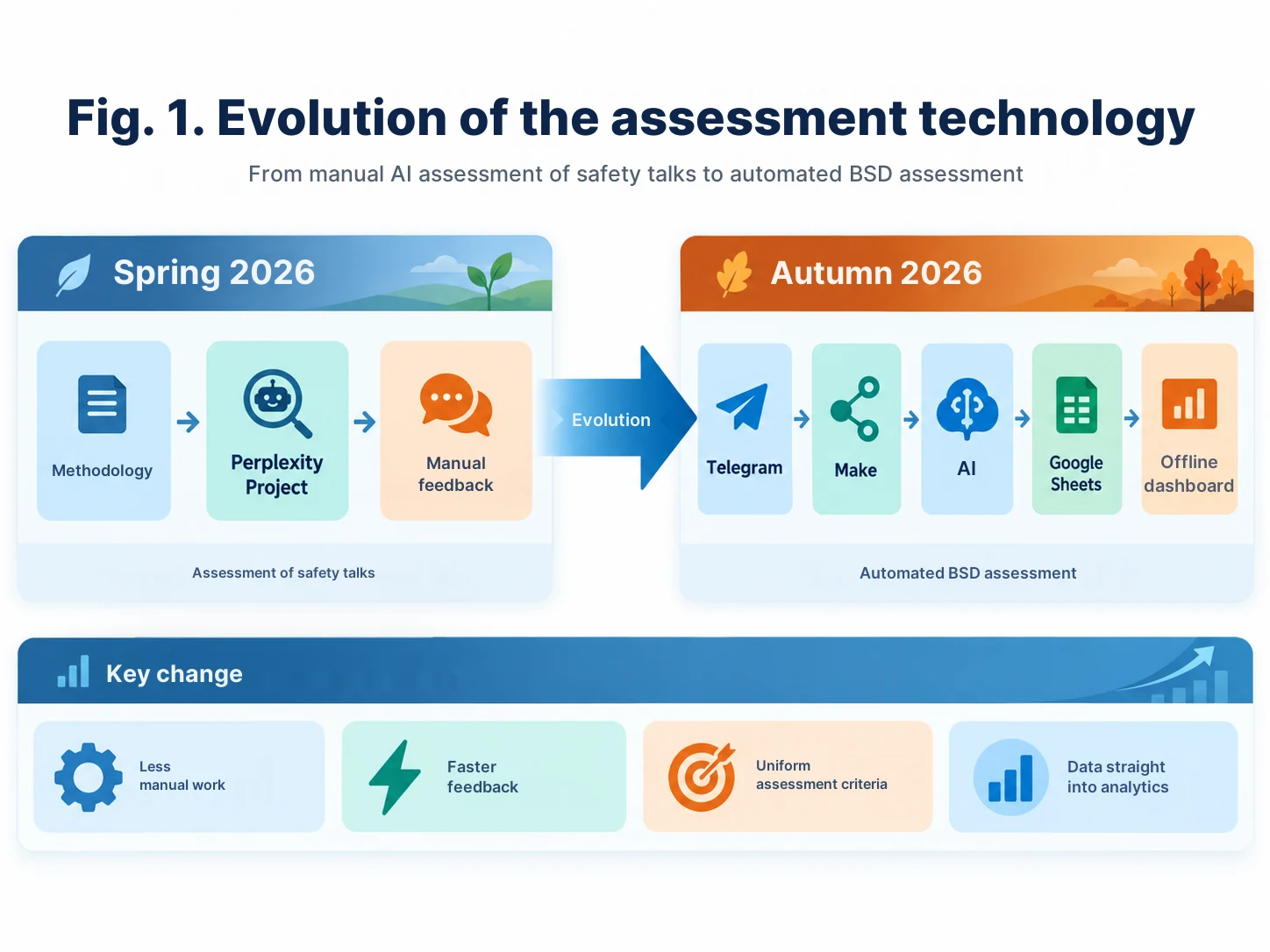
In the spring of 2026, we started with safety talks. Before launching the AI assessment, methodological guidelines and an educational video on how to conduct a safety talk correctly were prepared. Only after that did the digital assessor appear.
As the first working environment, we used Perplexity Space — today a similar environment in Perplexity is called Project. The methodological guide and the assessment checklist were uploaded to the project, and a strict prompt was prepared separately for the model.
The task of the prompt differed fundamentally from the usual request to "assess the performance". The AI was allowed to count only what was actually said in the audio. If an element is missing — 0 points. If mentioned formally — partial completion. If covered logically and fully — completed.
There are seven criteria in the current checklist: introduction and goal; specific hazard; "hazard – consequences – measures" logic; emotional impulse; safety measures; dialogue with workers; final summary and connection with the work being performed.
Prompt 1 — see the modernized version of the prompt for Perplexity Project in the appendix.
What the first, still manual, environment looked like
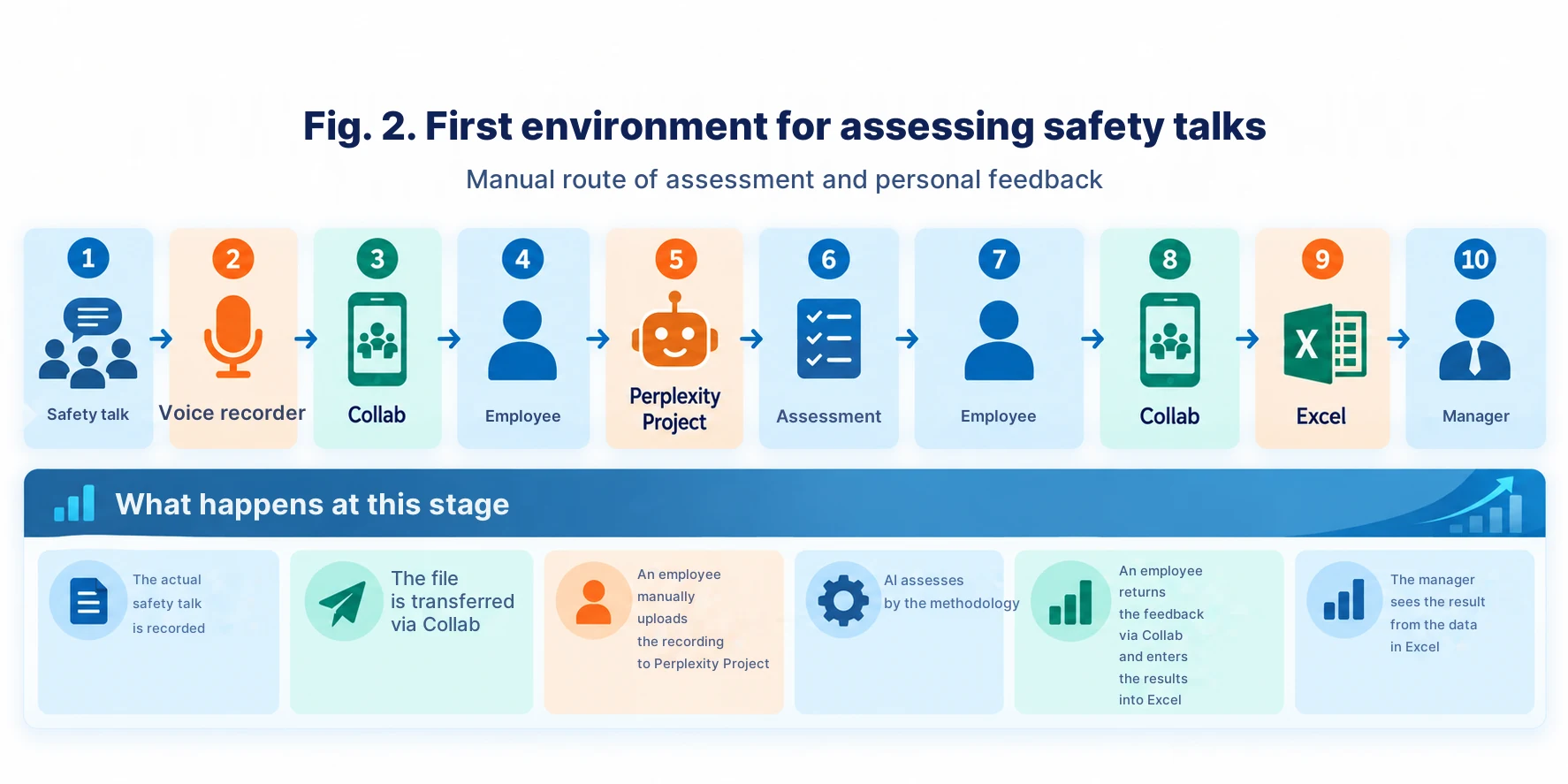
The shift supervisor recorded the conducted safety talk on a voice recorder. Through the corporate application Collab, the recording was transferred to an assigned employee. The employee uploaded the audio to Perplexity Project, received the assessment and returned personal feedback to the manager, also via Collab.
At the same time, the result was entered into Excel: department, manager, score, number of attempts. Using the table, we built simple analytics — average results of departments, dynamics and the number of repeated cycles.
We accepted 80% as the passing level for the practical cycle. If the result was lower, the manager conducted the next safety talk already taking into account the AI's comments. This resulted not only in control, but also individual training directly at the workplace.
We checked not only the human — first we checked the AI itself
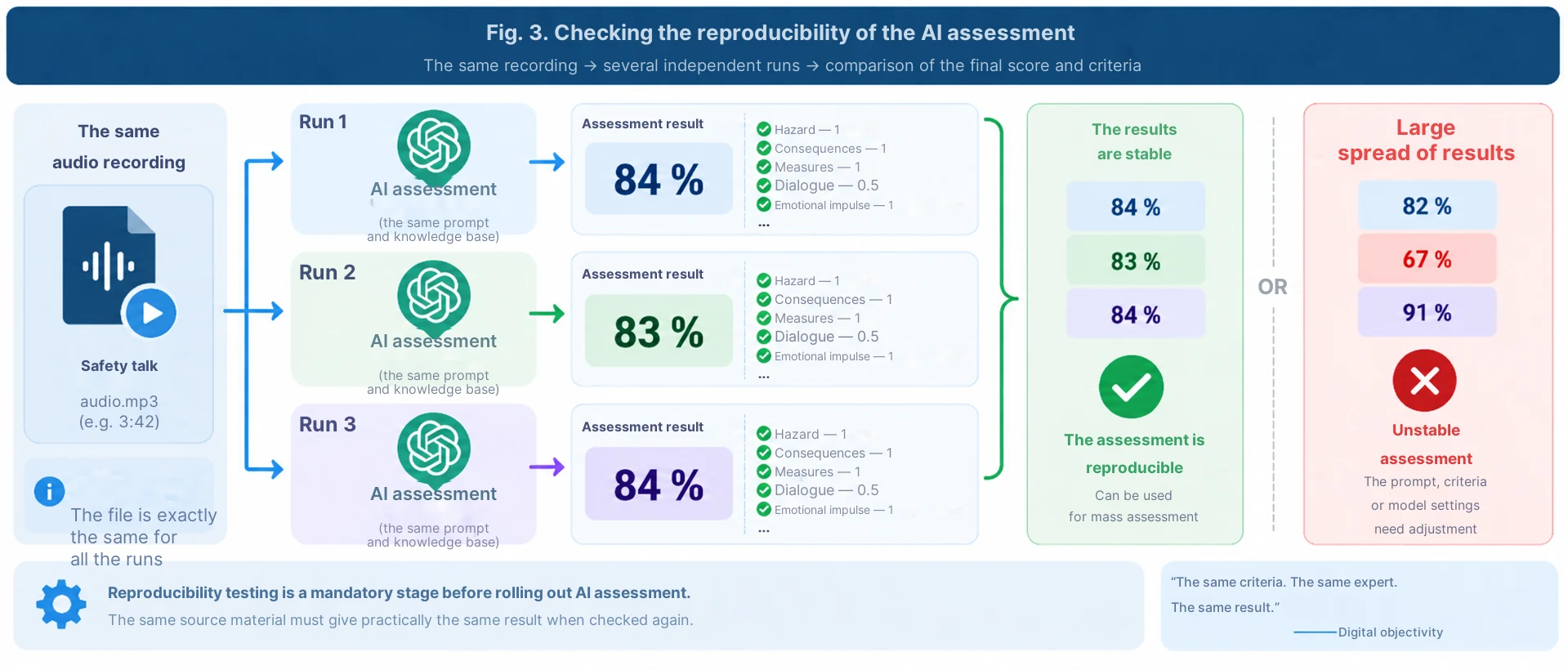
For me, this is one of the most important elements of the whole scheme. We intentionally sent the exact same audio recording for assessment several times. If the same material gets 82% today, 65% a minute later, and then 91%, such a digital expert is not yet ready to assess people.
Therefore, we aimed for reproducibility: the identical recording should yield an identical or practically identical score. If the variance became noticeable, we adjusted the prompt, refined the criteria and removed ambiguous wording.
To myself, I call this "digital objectivity". This does not mean that AI possesses absolute truth. It is about something else: a single expert applies the same scale to everyone and does not depend on mood, personal sympathies or who exactly is conducting the check today.
Prompt 2 — see the reproducibility check protocol of the assessment in the appendix.
Why the manual scheme ceased to be satisfactory
For the pilot, the manual route was convenient: receive the file, upload it, wait for the result, return feedback and enter the score in Excel. But such an approach has a natural limit.
When the volume is measured in hundreds and thousands of recordings, we start automating not the assessment, but creating new administrative work around the assessment. Therefore, during the transition to behavioural safety dialogues, the task was formulated differently: remove the human from the technical chain where their participation does not create value.
Stage 2. A behavioural safety dialogue is more complex than a normal safety talk
A behavioural safety dialogue (BSD) is not just a short speech. The methodology includes observing actual work and conversing with a person. It is important for the manager to see safe or unsafe behaviour, and then through questions achieve a result where the worker themselves names the hazard, possible consequences, and the safe way to perform the work.
If the worker is working unsafely, the key part of the conversation is to discuss the hazards and consequences, then the safe way of working and other sources of hazard. If the person is working safely, the manager must notice and reinforce the correct behaviour, and then use the conversation to discuss other safety issues.
That is precisely why the BSD assessment environment must check not only the manager's words, but also the presence of a real dialogue: whether questions were asked, whether the worker answered, whether the reasons for the behaviour, consequences, safe actions and the conclusion of the conversation were discussed.
Pseudonymous identifier instead of a surname
During mass automation, we separately solved the issue of identification. Within the corporate ERGIS environment, each participant is assigned a special code like RSS 1256. This is neither an employee ID nor a surname.
Before starting the recording, the manager says their RSS code, after which they conduct the BSD. In the conversation, there is no need to name surnames or employee IDs. The correspondence "RSS code ↔ specific employee" remains inside the corporate environment and is used later during local analytics.
Here it is more correct to speak not of complete anonymisation, but of pseudonymisation: the person's voice still remains in the audio file. But the volume of personal data passing through the automated environment is significantly reduced.
A little secret: I am not a programmer
We assembled the architecture of the new solution via Make. I am not a programmer and at the beginning of the work I wrote about this directly to ChatGPT.
The request was simple: "Guide me through creating this automation step by step. Give one action at a time. I will perform it in Make and send a screenshot. After checking, give the next command".
Then exactly that happened. ChatGPT explained which module to create and what to fill in it; I performed the action and sent a screenshot; after checking, I received the next step. Similarly, the Telegram bot was created and the entire chain was linked.
This is an important conclusion for me from the practice of vibe coding: a specialist does not need to know the API or Make syntax in advance. But they must understand the production process well, the result that the user should get, and be able to consistently check each stage.
Prompt 3 — see the starting prompt "guide me step by step through Make" in the appendix.
What happens now: Telegram → Make → AI → result
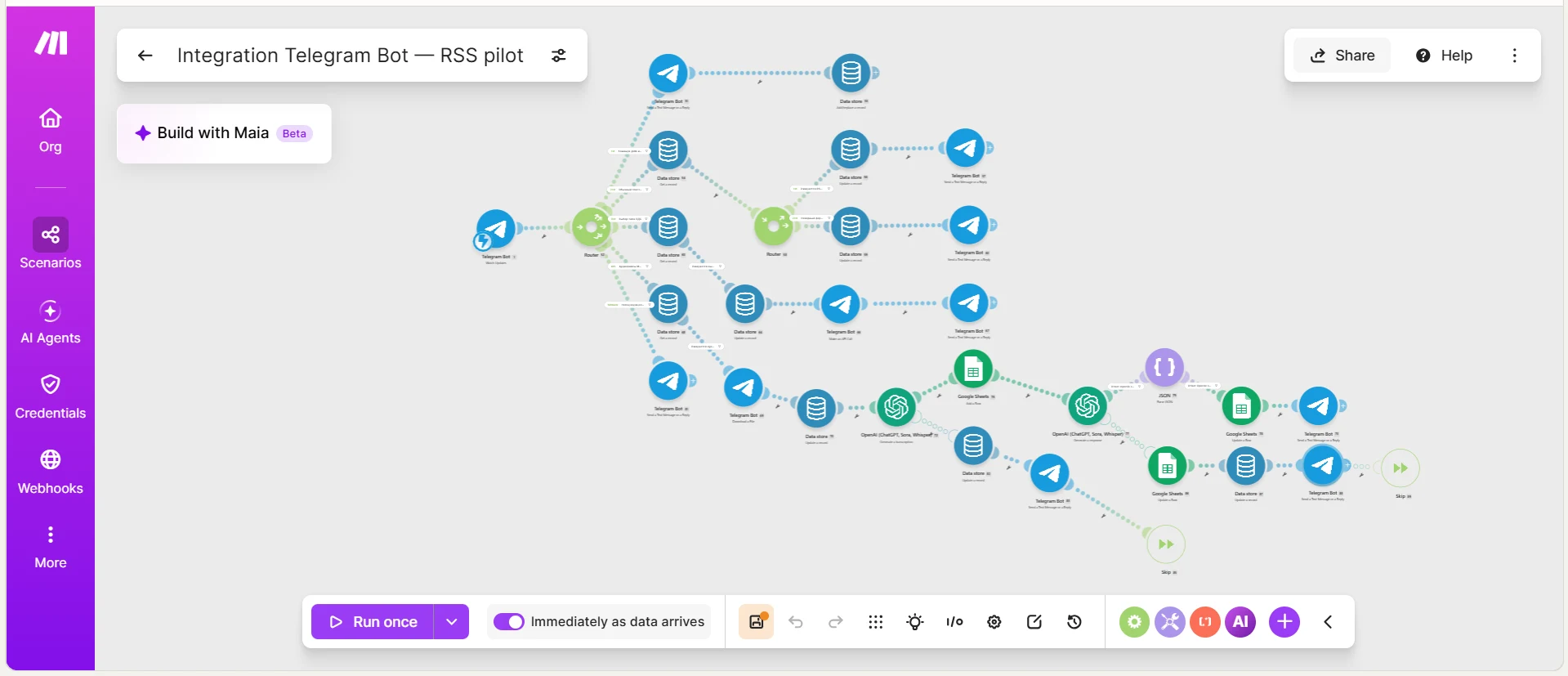
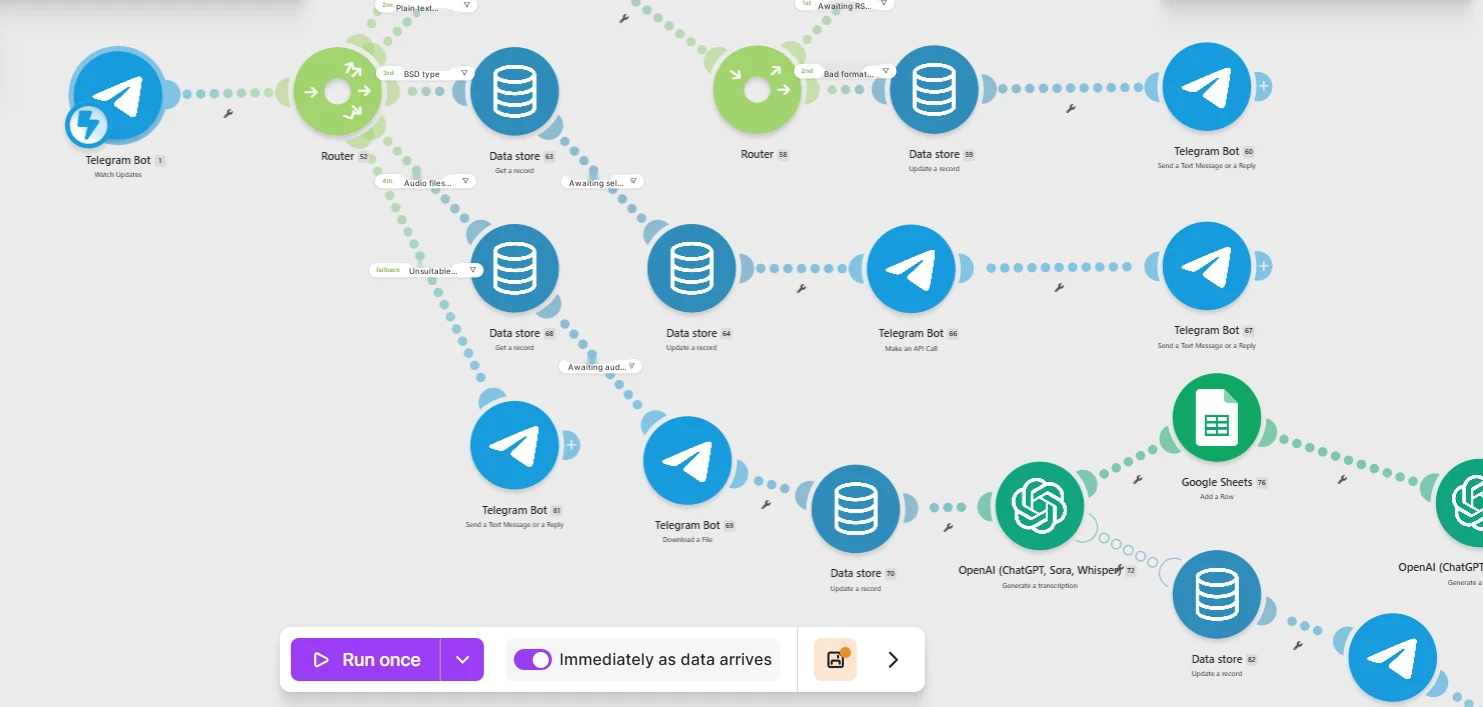
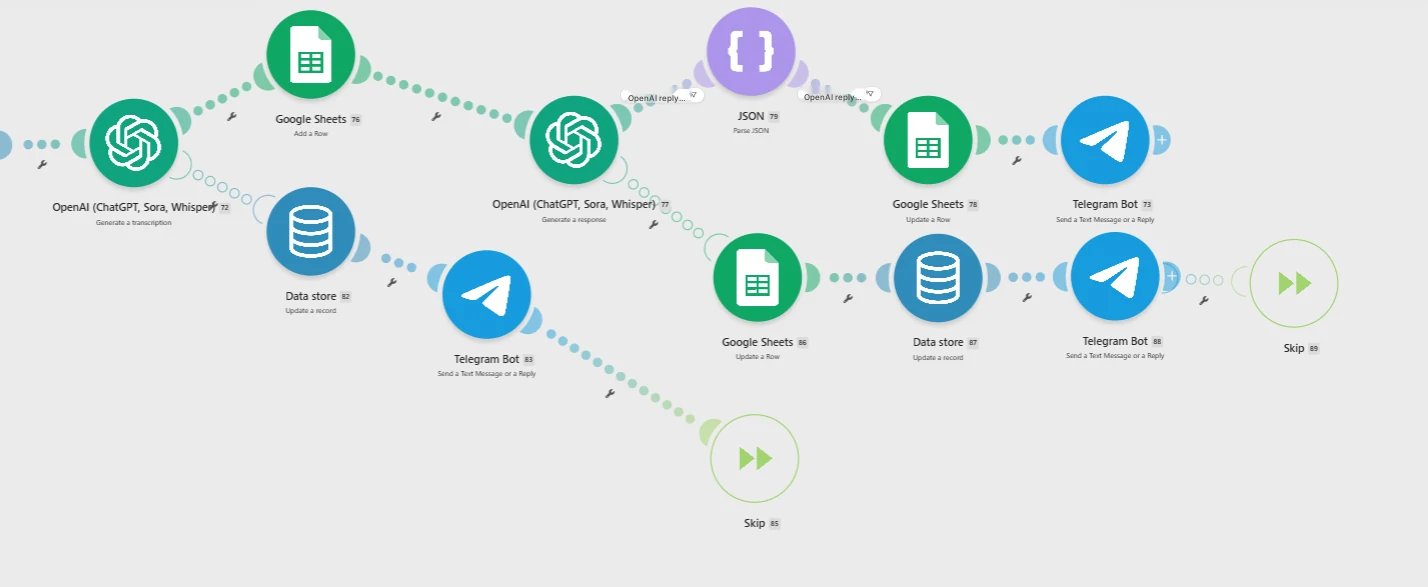
The modern environment works almost without a manual operator. The manager sends an audio recording to the Telegram bot. Make receives the file, checks the input data and launches the processing route. The AI analyses the recording according to the specified methodology, forms an assessment and feedback. The result is returned to the user and simultaneously recorded in Google Sheets for general analytics.
In the current pilot, feedback returns in approximately tens of seconds. For the user, it looks simple: sent audio — received an assessment, strengths, specific errors and what to change next time.
The Make diagram shows that behind this simplicity lies a full-fledged routing: Telegram, Data store, Router, OpenAI, Google Sheets, checks and return messages to the user.
Is this a multi-agent or not?
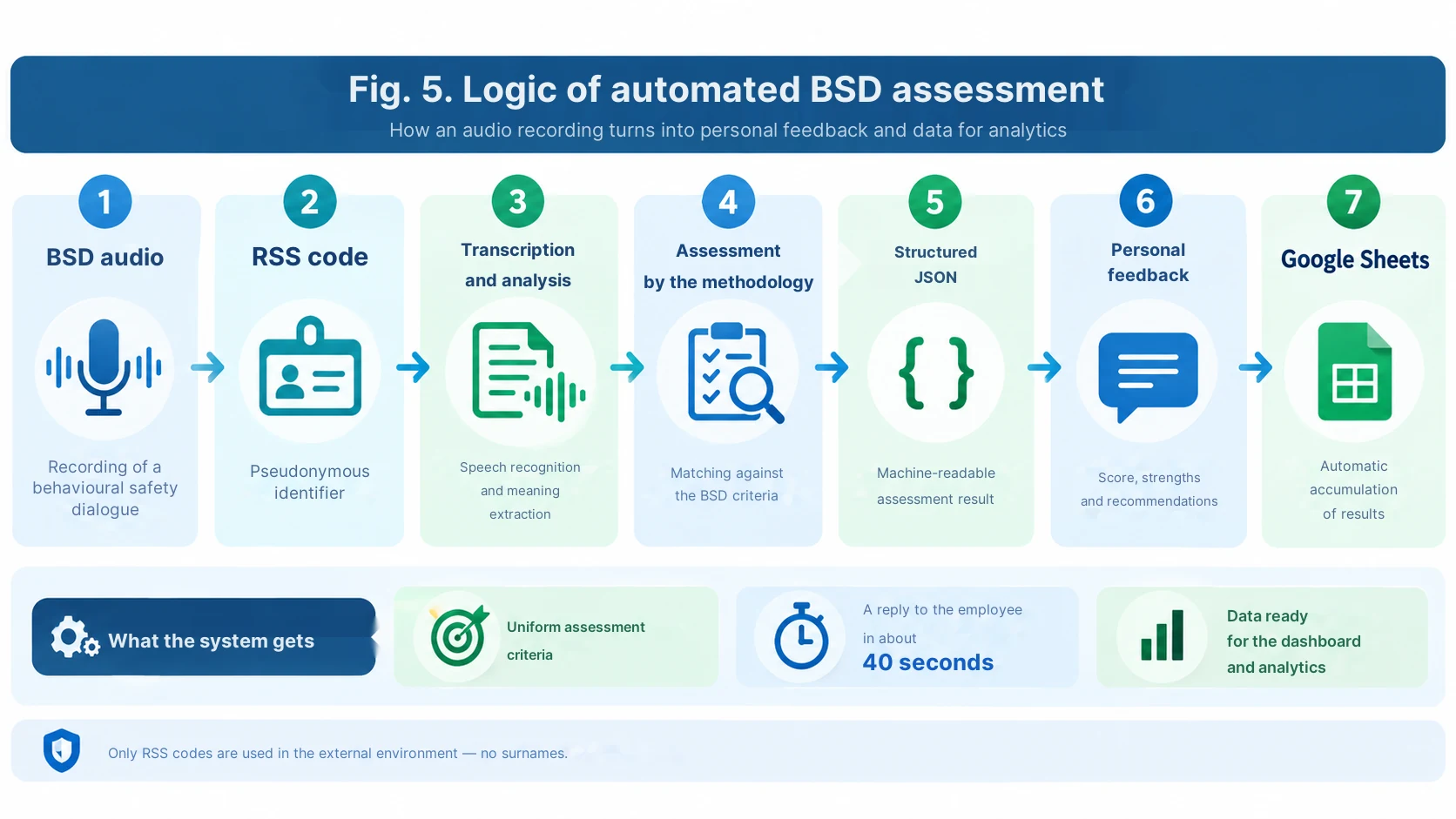
I would not use the word "multi-agent" here just for effect. In practice, we have a multi-step expert loop in which different parts of the scenario perform different functions: file reception and routing, identifier extraction, content analysis, expert assessment, structuring the result, recording to a table, and personal feedback.
If several separate model calls work with different system roles — for example, one analyzes the dialogue, a second checks compliance with the methodology and formats the outcome — this can already be considered multi-agent or many-agent logic. If a single model call performs all functions, it is more honest to talk about a multifunctional AI assessor.
In the appendix, I therefore divided the prompts by function, rather than calling each function a separate agent.
How automated BSD assessment is structured
In an industrial scenario, it is important to separate two tasks. The first is expert: to assess the content of the conversation strictly against the methodology. The second is technical: to return the result in a format that Make will understand and be able to write to Google Sheets.
Therefore, a structured JSON response is convenient for automation: RSS code, final score, status, strengths, areas for improvement, short feedback, and individual assessment criteria. Such a format reduces the risk that the automation will "break" due to beautiful but unpredictable model text.
At the same time, the strict rule remains the same as in the spring: do not give credit for what is not in the recording; do not guess intentions; do not make up the correct answer for the supervisor. If the transcription is incomplete, the recording must be sent for re-upload, not receive an invented assessment.
Prompts 4–6 — BSD assessment, structured JSON, and feedback generation, see the appendix.
From personal assessment to the picture across departments
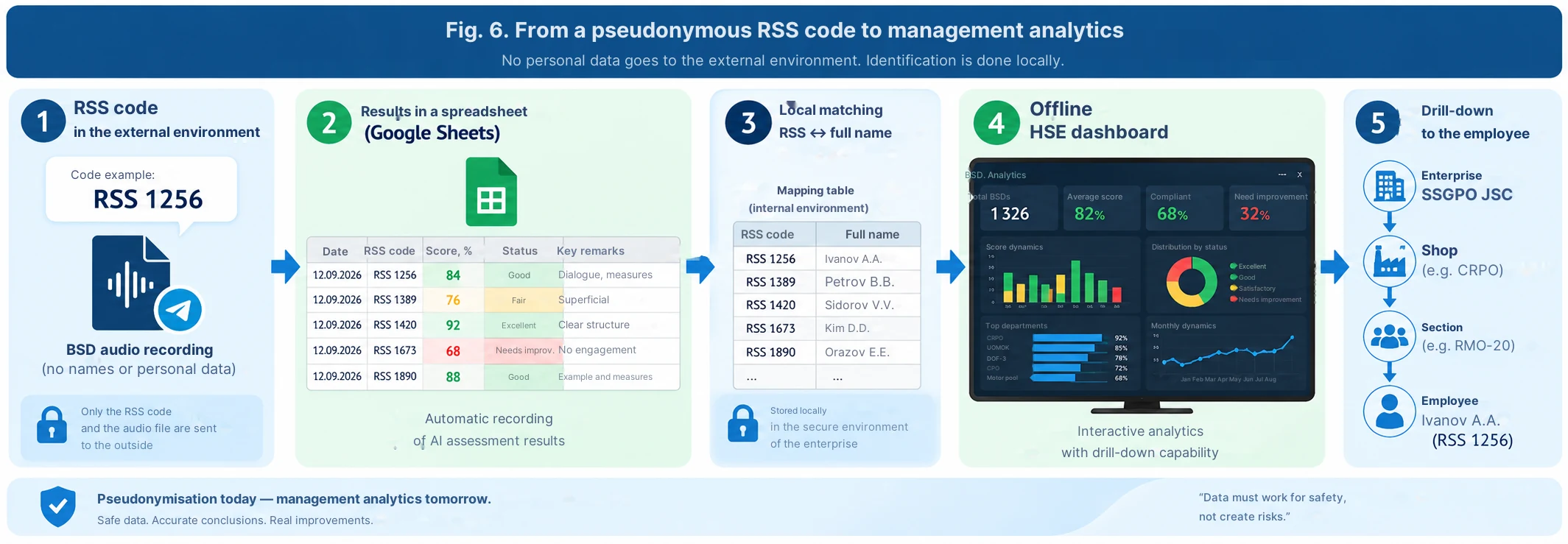
After each assessment, what accumulates in Google Sheets is no longer just text feedback, but a structured dataset. Therefore, it is possible to see the number of BSDs conducted, the average result, main recurring mistakes, dynamics, and results by pseudonymous RSS codes.
The next step is already familiar to us from the second article: locally map the RSS code to the full name within the corporate perimeter and load the result into a standalone HSE dashboard. Then the supervisor sees the picture across the enterprise, workshop, and site, and, if necessary, drills down to a specific worker.
That is, the external assessment loop can operate without a surname, and the complete management picture is restored only inside the enterprise.
How this idea can be replicated without our architecture
The essence of the approach is not tied to a single AI brand. In the simplest version, you can create a Perplexity Project with the methodology and the assessment prompt. You can use ChatGPT with a persistent instruction and an uploaded knowledge base. You can build a setup around Google NotebookLM / Gemini Notebook as a source of methodological materials, and perform the assessment with a separate model. For a mass flow, it is more convenient to use Make or another automation platform with Telegram, OpenAI, and spreadsheets.
The key elements remain the same: approved methodology → strict prompt → reproducibility check → clear scale → personal feedback → structured result accumulation.
What has changed over the last few months
In the spring, one employee manually transferred audio files to the AI and returned the result. Today we are building a loop capable of receiving and assessing about 1300 BSD recordings without a separate operator for each file.
But the main change is not even in speed. We have gained the ability to apply the same criteria to a large number of real conversations and turn every assessment into a short individual learning cycle.
AI in this scheme is not an inspector looking for a culprit. It is simultaneously a second expert and a digital coach: it records non-compliance with the methodology, explains exactly what needs to be improved, and allows testing this in the very next conversation.
Conclusion
When we started, the task sounded like an experiment: could an AI assess a safety talk. The result is a technology that can be scaled to behavioural safety dialogues, training, and other types of safety communications.
For me, the most valuable result is not the automatic number. The value is that the supervisor receives feedback almost immediately after a real conversation, and the enterprise simultaneously receives a dataset on which elements of the methodology are genuinely difficult for people.
It is exactly here that AI starts working not instead of the safety management system, but inside it — as a uniform second expert.
Prompts for the article "AI as a second expert"
Safety talks, reproducibility checks, Make, and automated BSD assessment
This is a publication version of the prompts. It is based on a real methodology and our working architecture, but before applying it at another enterprise, the criteria and thresholds must be replaced with approved local requirements.
Prompt 1. Upgraded safety talk assessment in Perplexity Project
This is an improved publication version of the active prompt. I have fixed the internal contradictions: the checklist now actually contains 7 criteria, and the passing threshold is identical everywhere — 80%.
You act as an expert in occupational health and industrial safety, performing a control quality assessment of a safety talk conducted by a shift supervisor.

SOURCES AND PRIORITY
1. Audio recording of the safety talk.
2. The approved methodological guidelines of the enterprise.
3. The approved assessment checklist.
In case of conflicting wording, be guided by the approved checklist and methodology. Do not add your own criteria.

STAGE 1. FULL TRANSCRIPTION
- First, obtain a full transcription of the audio, not a brief summary.
- For Perplexity Project, use the available nested audio file reading tool in full mode (READ / maximum available context budget).
- Mark illegible fragments as [illegible].
- If less than 80% of the speech is coherently recognized or a significant part of the recording is missing, reply only: "Insufficient data. Reload the file." and stop.
- Do not output the full transcription in the final report.

STAGE 2. EXPERT ASSESSMENT
Assess only what actually sounded in the full transcription.
It is forbidden to:
- make assumptions about the foreman's intentions;
- give credit for things that are not in the recording;
- improve the wording for the person being assessed;
- compensate for a missing element with an overall good impression.

SCALE FOR EACH CRITERION
Completed = 1 point.
Partially = 0.5 points.
Not completed = 0 points.
Rule:
- missing in the audio → 0;
- mentioned formally, without elaboration → 0.5;
- elaborated logically and correctly → 1.

CHECKLIST — ASSESS ALL 7 ITEMS WITHOUT OMISSIONS
1. Introduction of oneself and the goal of the safety talk.
2. Naming a specific hazard / current topic.
3. The logic of "hazard → consequences → safety measures".
4. Emotional impulse through real/potential consequences or a relevant example.
5. Specific safety measures.
6. Dialogue with workers: questions, answers, involvement.
7. Final summary and connection with current / upcoming work.

RESPONSE FORMAT
1. Table:
No. | Criterion | What actually sounded | Assessment | Point

2. Total:
Scored: X out of 7.
Percentage: (X/7)*100, round to 1 decimal place.

3. Cycle status:
- if the result >=80%: "Passing level achieved";
- if the result <80%: "Passing level not achieved. A repeated safety talk is recommended after reviewing the feedback".

4. Strengths — 2–5 specific points, only from the recording.
5. Areas for improvement — specifically on unfulfilled/partially fulfilled criteria.
6. Feedback to the foreman — 3–5 sentences: business-like, demanding, developmental style.

PRE-RESPONSE CONTROL
Before the final response, double-check:
- the sum of points matches the table;
- the percentage is calculated correctly;
- not a single one of the 7 criteria is missed;
- not a single statement is based on something that was not in the audio.
Comment: The main principle is retained from the original version: full transcription first, then assessment solely based on what actually sounded. In Perplexity, the specific name of the file reading tool may change, so in the public version it is better to describe the function rather than rigidly tying the reader to the name search_files_v2.
Prompt 2. Reproducibility check ("digital objectivity")
This prompt is used after several independent runs of the same recording.
I am validating the reproducibility of the AI assessor.

I have the results of N independent assessments of THE EXACT SAME audio recording using the exact same checklist.
I will pass you the final tables/JSON of each run.

Your task:
1. Compare the final percentage between the runs.
2. Compare the score for each criterion.
3. Highlight the criteria for which the model changes its decision most often.
4. Calculate:
   - the minimum final percentage;
   - the maximum final percentage;
   - the range in percentage points;
   - the average final percentage.
5. Do not reassess the original recording yourself and do not choose the "correct" assessment — analyze only the stability of the assessor.

CRITERION FOR THE PILOT
- difference of 0–2 p.p. — high reproducibility;
- 2.1–5 p.p. — acceptable, but check controversial criteria;
- more than 5 p.p. — prompt/criteria require revision.

Output in the format:
- Reproducibility level;
- Where the variance occurs;
- What exactly in the prompt needs to be made more unambiguous;
- Whether the test needs to be repeated after adjustment.

Do not call this absolute objectivity. Use the term "reproducibility of the assessment".
Comment: The variance threshold in the example is a working guideline for publication, not an approved corporate norm. It can be removed or replaced with your own.
Prompt 3. ChatGPT as a step-by-step mentor for Make
This is the exact principle that allows a person without programming skills to repeat the solution.
I am not a programmer and have never built scenarios in Make before.
Help me create an automation using the "one action at a time" principle.

GOAL
A Telegram bot receives an audio recording of a behavioural safety dialogue (BSD). Then Make should:
1. get the file;
2. check the input type;
3. extract/get the audio;
4. pass the material to the AI for analysis;
5. get a strictly structured result;
6. write the result to Google Sheets;
7. send the user short personal feedback;
8. correctly handle errors, duplicate files, and unsupported formats.

RULES OF OUR WORK
- Give only ONE next step per message.
- Write the exact name of the Make module to be added.
- Write what to select in each required field.
- If a variable from a previous module is required — specify its exact origin.
- After each step, stop and ask me to send a screenshot.
- Using my screenshot, first check if everything is done correctly. If there is an error — we fix it and only then move on.
- Do not skip steps and do not send the whole scenario at once.
- Explain in simple words, without assuming that I know API, JSON, or programming.
- If there are several ways, choose the simplest and most reliable one for the pilot and briefly explain why.

RESTRICTIONS
- the user identifier in the assessment loop is a pseudonymous code like RSS 1234;
- surnames and employee numbers are not needed;
- the output for the table must be structured;
- only understandable feedback is sent to the person in Telegram, without technical JSON.

Start with the first step: creating/connecting a Telegram bot and the first input module of Make.
Prompt 4. The core of BSD assessment for OpenAI/ChatGPT in Make
This is the universal publication version of the assessment block. It specifically returns JSON — this way Make writes the result to the table and routes the response more easily.
SYSTEM ROLE
You are an expert assessor of the quality of behavioural safety dialogues (BSD). You assess ONLY the content of the provided transcription and apply the approved methodology of the enterprise.

IMPORTANT
If the enterprise has provided a separate approved checklist, it takes priority over the sample structure below.
Do not invent criteria that are not in the methodology.

BASIC PRINCIPLES OF THE METHODOLOGY TO BE CHECKED AGAINST THE AUDIO
- there is a real conversation with the worker, not a monologue/inspection;
- questions are asked to the worker;
- the worker themselves names/discusses the hazard and possible consequences if the situation is hazardous;
- the safe way to perform the work is discussed;
- other sources of hazard and safety measures are discussed;
- in the case of safe work, the supervisor notes and reinforces a specific safe action;
- communication is respectful;
- the conversation ends with a clear summary/gratitude;
- do not give credit for visual observation if it cannot be confirmed from the audio.

INPUT
- transcript: full transcription;
- rss_id: a pseudonymous identifier like RSS 1234;
- methodology_context: excerpts/rules of the approved methodology;
- optional_checklist: an approved local checklist, if any.

ASSESSMENT RULES
1. Use only facts from the transcript.
2. Do not guess intentions.
3. Do not reconstruct the full name by voice/context.
4. If the transcript is explicitly incomplete or incoherent — quality_status="insufficient_data" and do not give a final score.
5. If a local checklist is applied, assess all its items without omissions.
6. For each conclusion, keep a short evidence — a phrase/content from the transcription confirming the decision.

OUTPUT — ONLY JSON, NO MARKDOWN AND NO TEXT BEFORE/AFTER
{
  "rss_id": "RSS 1234",
  "quality_status": "ok | insufficient_data",
  "overall_score_percent": 0,
  "result_status": "meets | partly_meets | does_not_meet | not_scored",
  "criteria": [
    {
      "criterion": "...",
      "score": 0,
      "max_score": 1,
      "evidence": "...",
      "comment": "..."
    }
  ],
  "strengths": ["..."],
  "improvements": ["..."],
  "feedback_short": "3-5 sentences, understandable to the supervisor",
  "method_errors": ["..."],
  "worker_involvement": "high | medium | low | not_clear"
}

CHECK BEFORE RESPONDING
- JSON is valid;
- rss_id is not changed;
- the final score matches the sum of criteria;
- evidence does not contain invented facts;
- if data is insufficient, there is no invented overall_score_percent.
Comment: Since a separate approved scored checklist for BSD is not recorded in the provided materials, I am not presenting an invented scale as a corporate standard. In the working version, you need to substitute your actual checklist.
Prompt 5. Separate feedback module in Telegram
If a second model call is used in the scenario, it is beneficial to limit it only to formatting the ready evaluation. This increases stability: the second module should not "rethink" the scores anew.
You receive the READY JSON of the expert BSD evaluation from the previous step.
Do not re-evaluate the recording and do not change the scores.

Generate a short response to the user for Telegram.

FORMAT
RSS: <code>
Score: <percent or "not evaluated — insufficient data">

What was done well:
• 2–4 short points from strengths

What to improve:
• 2–4 specific points from improvements

For the next BSD:
<1–2 maximally specific actions>

RULES
- 700–1200 characters maximum;
- businesslike and respectful tone;
- no technical JSON;
- no last names;
- do not invent new remarks;
- do not use motivational slogans;
- if quality_status=insufficient_data — ask to re-record/re-upload the audio and do not output a score.
Prompt 6. Result normalization before Google Sheets
This step is useful if Google Sheets must receive the same structure regardless of the evaluation text length.
Check the data row before writing to Google Sheets.

Expected fields:
- timestamp
- rss_id
- overall_score_percent
- result_status
- worker_involvement
- strengths_short
- improvements_short
- method_errors_short
- feedback_short
- source_message_id

RULES
1. Do not add full name and personnel number.
2. rss_id must match the pattern: RSS + space + 3–6 digits.
3. overall_score_percent must be a number 0–100 or empty if insufficient_data.
4. Convert arrays into short strings separated by "; ".
5. If a required field is missing — return error=true and list them in missing_fields.
6. If everything is correct — error=false.

OUTPUT ONLY JSON:
{
  "error": false,
  "missing_fields": [],
  "row": {
    "timestamp": "...",
    "rss_id": "...",
    "overall_score_percent": 0,
    "result_status": "...",
    "worker_involvement": "...",
    "strengths_short": "...",
    "improvements_short": "...",
    "method_errors_short": "...",
    "feedback_short": "...",
    "source_message_id": "..."
  }
}
Prompt 7. Audit of the finished Make scenario by screenshot
Suitable as a final prompt for checking the scenario before a mass pilot.
I will send you a screenshot of my Make scenario.
Conduct a technical audit as a no-code automation mentor.

Check based on the screenshot and my description:
1. module order;
2. Router routes;
3. unsupported message handling;
4. temporary state storage in Data store;
5. audio file receipt and transfer;
6. AI call;
7. JSON parsing;
8. writing to Google Sheets;
9. sending the result to Telegram;
10. error and retry branch;
11. risk of duplicates upon restart;
12. risk that one user will receive another's result.

Do not suggest a complete rebuild if the current architecture works.
First, list:
- what is already good;
- the 3 most critical risks;
- what ONE next step needs to be taken first.
After that, stop and wait for my screenshot/confirmation.
Practical sequence for the reader
- Upload the approved methodology and checklist into the selected Project/agent.
- Configure Prompt 1 and test it on several reference recordings.
- Run the same recording multiple times and apply Prompt 2 to evaluate reproducibility.
- If automation is required — start with Prompt 3 and build Make one module at a time with screenshot checks.
- In Make, use Prompt 4 as the expert core and demand strict JSON.
- If necessary, separate user feedback into Prompt 5.
- Before writing to Google Sheets, normalize the data with Prompt 6.
- Before the mass launch, check the entire scheme with Prompt 7.
Comments 2
Спасибо Александру Бондаренко за статью, есть над чем подумать. ИИ — сейчас очень модная и интересная тема. Коллеги проделали большую работу.
Предложенное решение помогает снизить хроническую перегрузку службы ОТ и ПБ и освободить от рутины как минимум одного сотрудника. На мой взгляд, ключевая польза в том, что система работает как «цифровой тренажер».
Однако, взвешивая все «за» и «против», я бы не советовал масштабировать ИИ-оценку пятиминуток и, тем более, поведенческих диалогов безопасности.
Таким образом, ИИ-оценка:
Не спешите искать в ИИ «второго эксперта», если проблемы с первым.
Иван, спасибо за содержательную обратную связь.
С риском «театра у микрофона» я согласен: если ИИ превратить просто в инструмент контроля ради оценки, пользы будет мало.
Но, наверное, в статье я не до конца раскрыл наш дальнейший путь. Апрельская диктофонная оценка была для нас прежде всего цифровым тренажёром.
ИИ не просто ставил оценку, а давал обратную связь: что сделано хорошо, что нужно улучшить, как лучше вовлекать работников и доносить риски.
Да, человек мог подготовиться и провести показательную пятиминутку. Но этим этапом мы убедились в главном: наши руководители знают и умеют проводить её правильно!
Сегодня мы уже идём дальше. Пятиминутки оцениваются системно по записям стационарных камер в местах выдачи наряд-заданий, а там, где камер нет, используются регистраторы «Ревизор». Это уже не специально подготовленная запись, а обычная ежедневная работа (она также сопровождается индивидуальной обратной связью с рекомендациями).
Поэтому ИИ для нас — не замена руководителю и не «цифровой надзиратель», а постоянный инструмент обучения и обратной связи. Особенно это важно для технически сильных специалистов, которым не всегда легко коротко, понятно и убедительно разговаривать с людьми.
С поведенческими диалогами всё действительно сложнее, и здесь мы пока ищем оптимальную модель. Но принцип остаётся тем же: ИИ не должен заменять живой разговор — он должен помогать руководителю проводить его лучше.
А главный критерий для нас — не оценка алгоритма, а изменение реального поведения людей!