
From Excel to an HSE dashboard and incident analysis without handing over personal data. Stage 1: the offline masker
Practical approach to preparing data safely for vibe coding and for work with cloud AI agents.
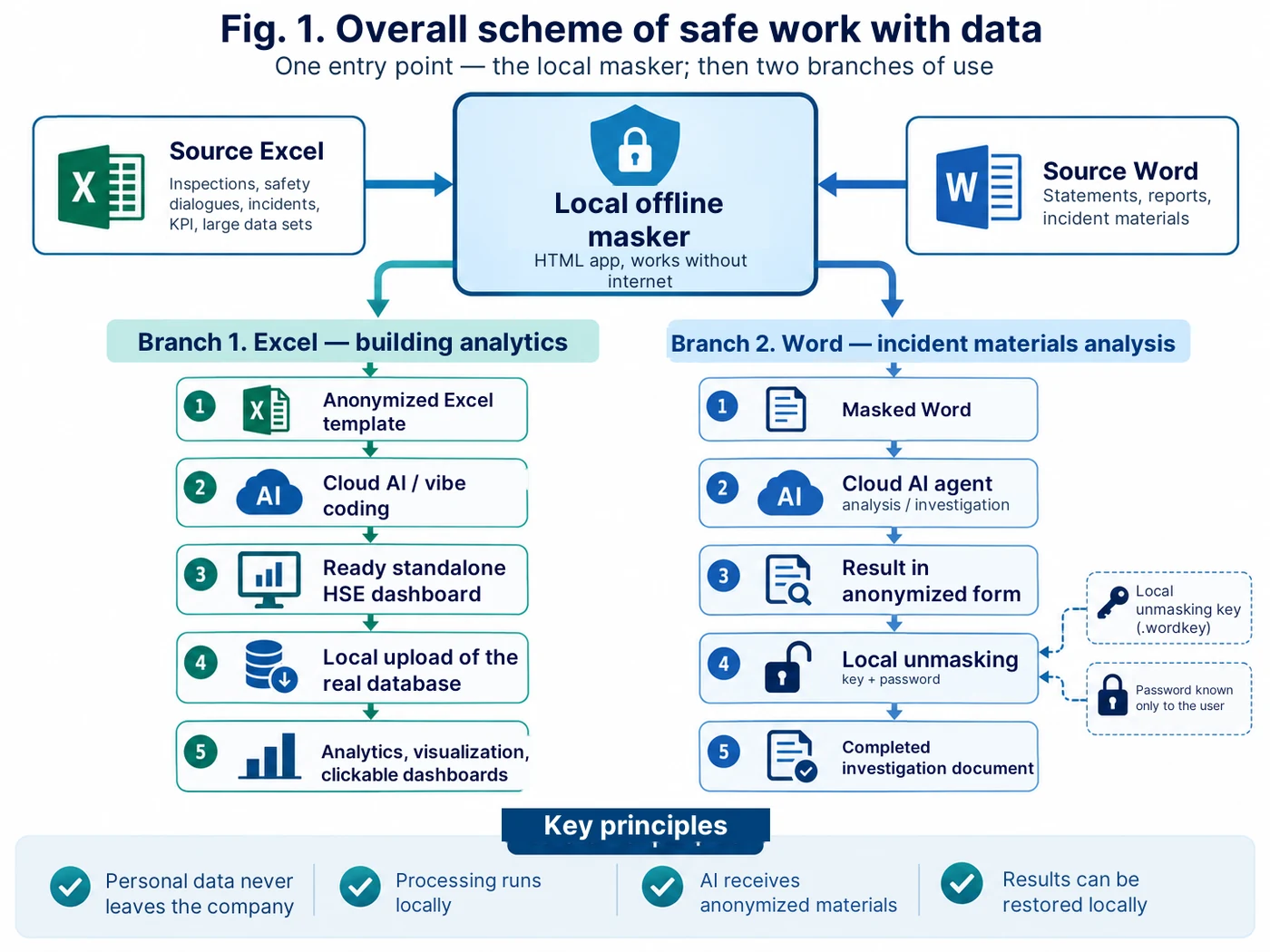
The idea behind the approach: working data stays inside the corporate perimeter. Only an anonymized copy or an already masked document is passed to the external AI environment. Personal values are restored back locally.
Why a separate masker was needed at all
Practical use of artificial intelligence in occupational health and industrial safety runs into the question of source data almost immediately. Working spreadsheets and incident materials may contain full names, personnel numbers, contractor names, contacts, amounts and other details that cannot simply be uploaded to an external service without a risk assessment.
At the same time it is precisely the real structure of the data that is needed to build a useful tool. A dashboard has to understand the actual fields and relationships of the table, and an incident-analysis agent has to understand the structure of explanatory notes, initial reports and other materials. So we separated the data from the tool.
As a result, the offline masker became the basic element for two directions at once: preparing anonymized Excel templates for subsequent vibe coding, and preparing Word documents for the analysis of incident materials with cloud AI agents.
Where to do the vibe coding and where to paste the prompts
For a beginner this is simpler than it looks: Prompt 1 from the “Ready-made Prompts” section (at the end of the article) does not need to be pasted into any special code editor. It is entered as ordinary text in an AI service that is able to create and modify applications or program code. The approach is always the same: open the development mode, paste the whole of Prompt 1, get the first version, check it and then, in the same conversation, give Prompt 2, Prompt 3 and Prompt 4 one after another.
In practice several options work. In ChatGPT — the “Work” mode or Codex, if they are available in your account; in Claude — Artifacts; in Gemini — Canvas; in Perplexity — the Create files and apps mode, if it is available on your plan; in Replit — Agent. For example, in ChatGPT it is enough to open “Work” or Codex, create a new task and paste the text of Prompt 1 into the message field. In Gemini: “Add files” → Canvas → paste the Prompt. In Perplexity: choose Create files and apps and paste the Prompt into the query line. In Replit: open Agent, switch on Plan first if needed, paste the Prompt and check the result in Preview after the build.
The mode names are current as of publication; interfaces and feature availability in these services may change over time.
For a first attempt I would recommend starting with ChatGPT, Claude or Gemini: there it is easier to work in plain language and refine the requirements step by step. If the program already exists and deeper code work is needed, Replit, Codex and other specialised development tools are convenient.
Important:whatever platform you choose, one requirement has to be stated separately at the start of the request: “the result is a single self-contained HTML file, with no external APIs, CDNs or network dependencies, able to work with the internet switched off”. And one more rule: real working Excel/Word files with personal data are never uploaded to a vibe-coding service. Only a verified anonymized copy or a test file is used for development.
Direction 1. Excel: an anonymized template for further vibe coding
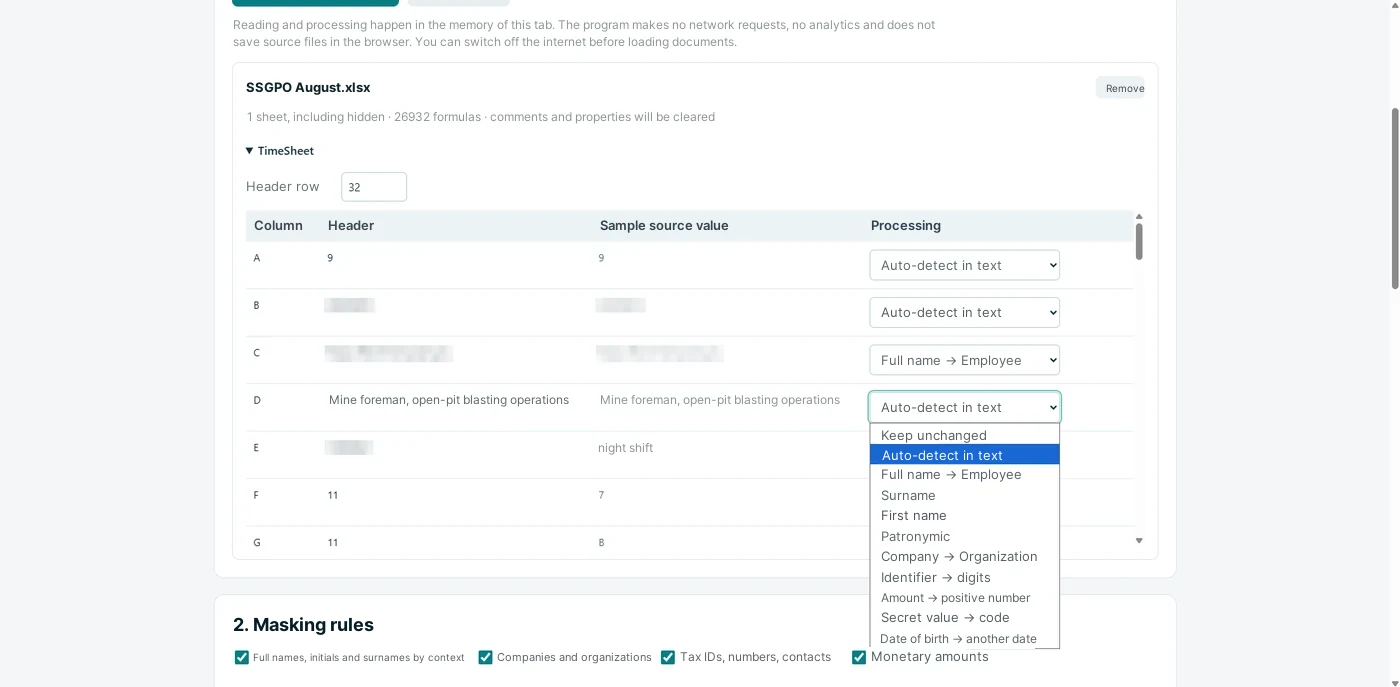
For analytics over large data sets it is important for us to keep the structure of the table: sheet and column names, data types, dates, categories, the “plant — shop — section” hierarchy, processes and other attributes. Real surnames and identifiers are not needed to develop the program shell.
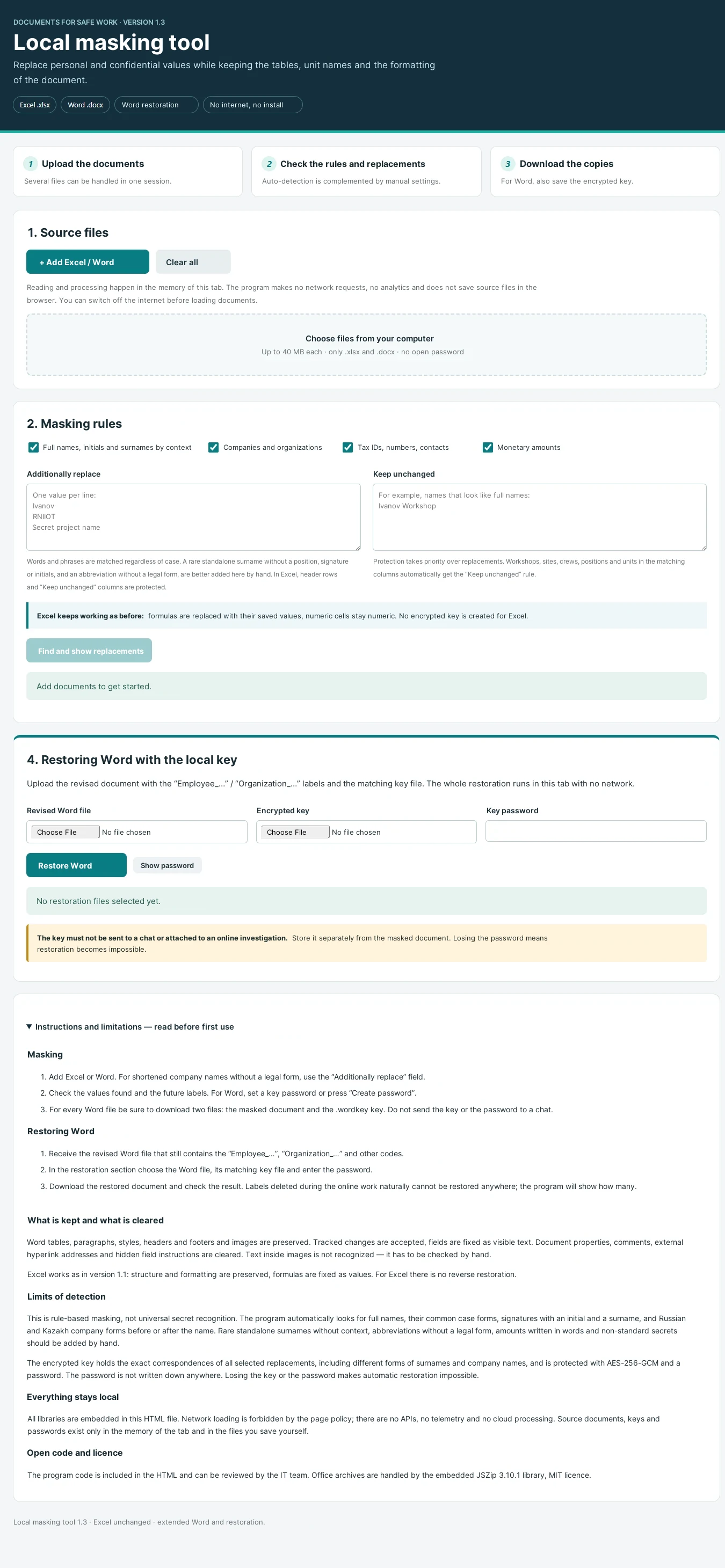
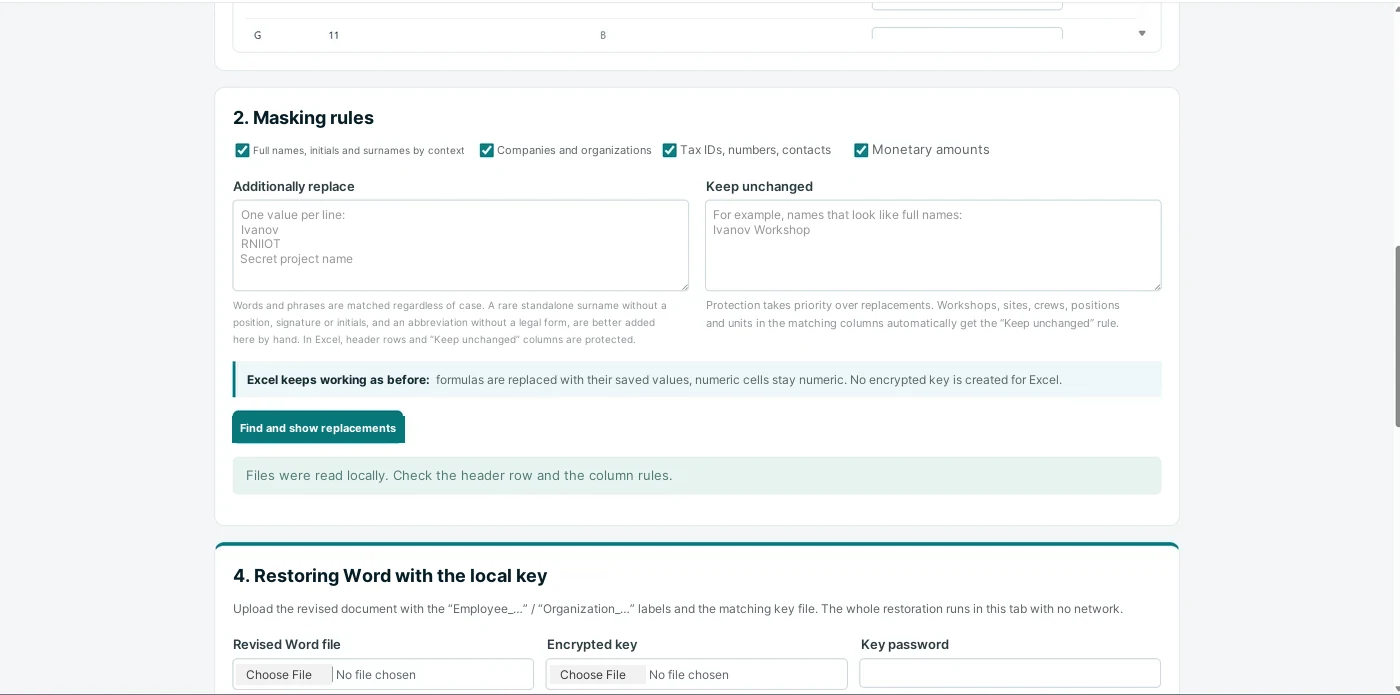
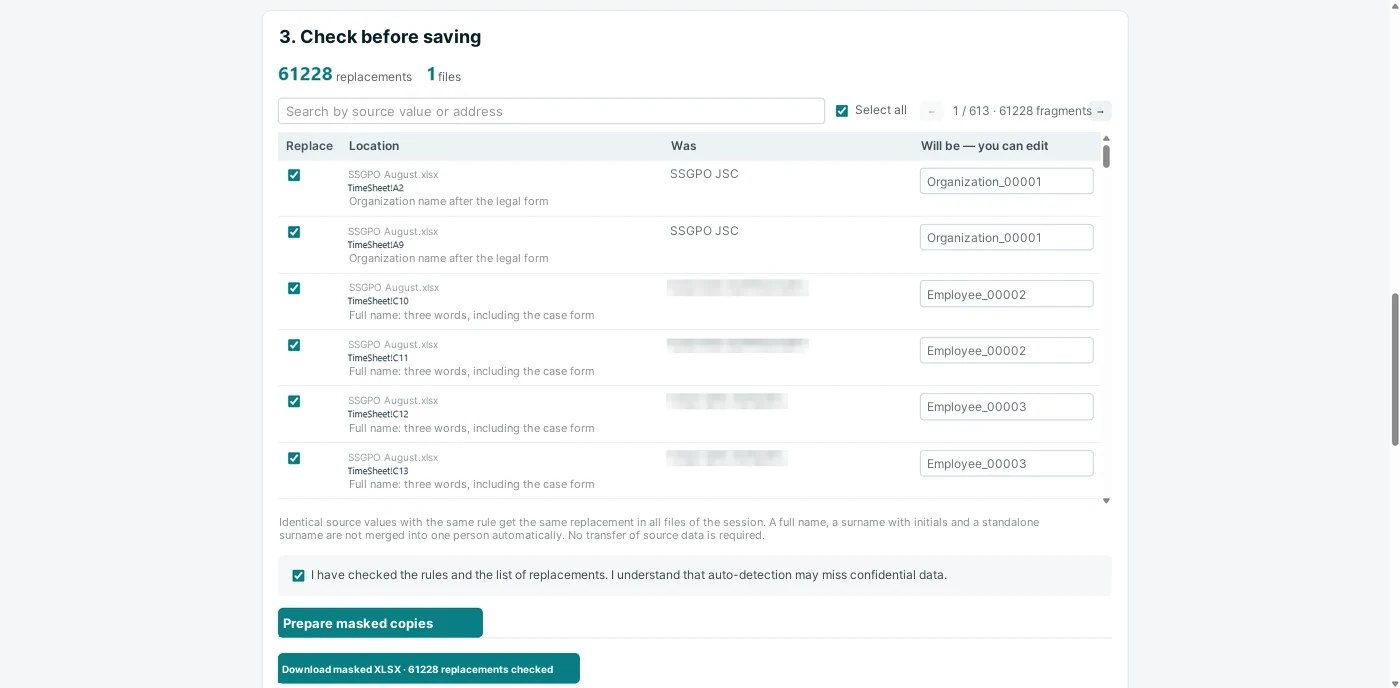
So the working Excel table is loaded into the local HTML masker. The program on the user’s computer finds potentially sensitive values, shows them before replacement and lets you correct the rules by hand. For example: “Ivan Ivanovich Ivanov → Employee_001”, “Contractor LLC → Organization_001”, “personnel number → ID_001”.
The output is an anonymized copy that keeps the logic of the original table. That copy can already be used when working with AI to build the program: filters, KPIs, interactive charts, search and drill-down to the record. The original Excel file stays inside the company.
Once development is finished, the real database should not be inside the HTML being built at all. The finished program provides a button for loading the source Excel locally: the file is read by the browser on the user’s computer, and the dashboard recalculates the figures inside the local session. That will be the second stage of this series.
The basic task statement for creating such a mode is given in Prompt 1 and Prompt 2 (see “Ready-made Prompts” at the end of the article).
Direction 2. Word: incident materials without disclosing personal data
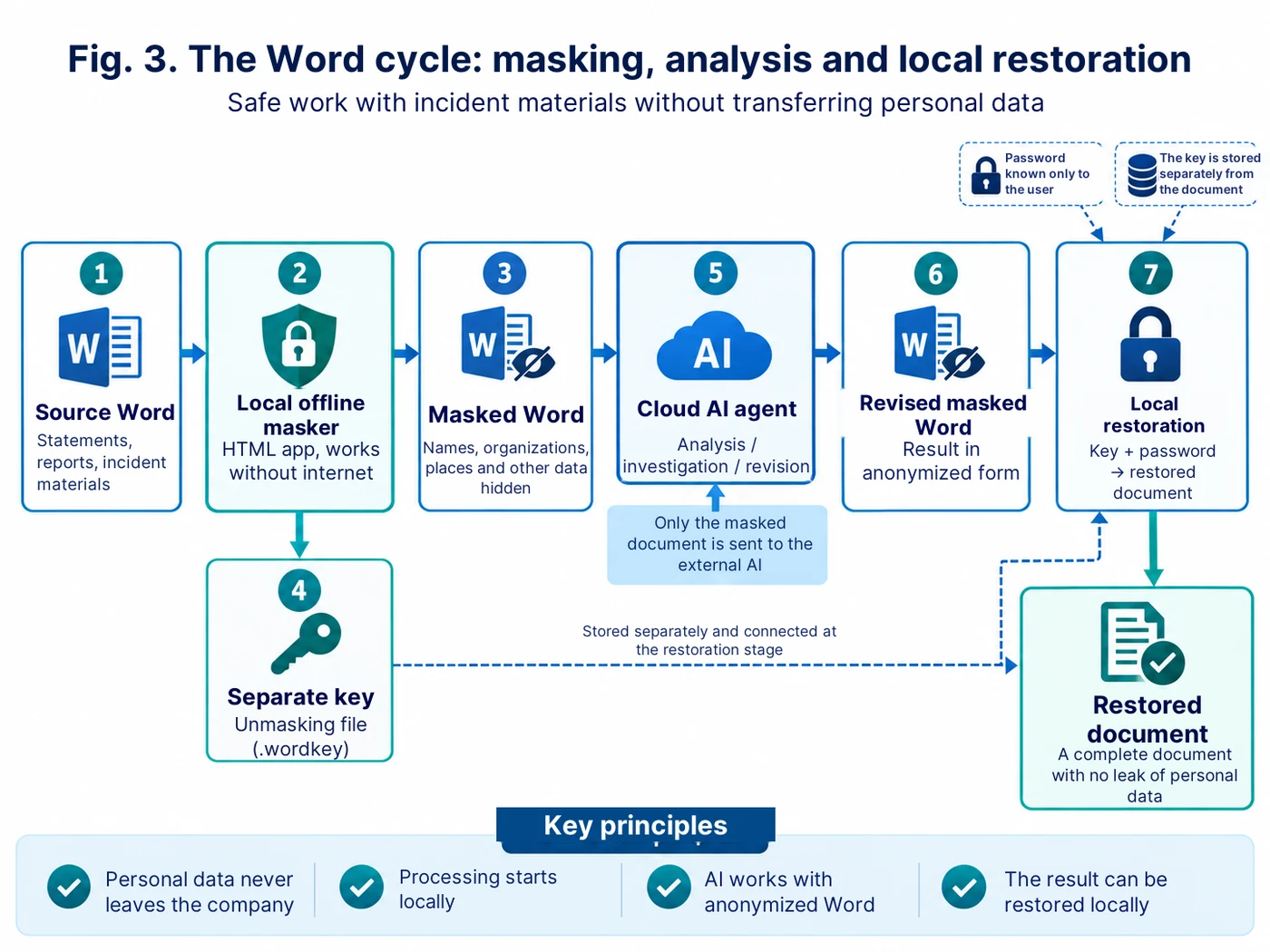
The second use of the masker is preparing incident documents for later analysis in a cloud AI. At the initial stage these can be the initial report, explanatory notes, employee statements and other materials in Word.
The masker creates an anonymized copy of the Word file: full names and other selected values are replaced with stable placeholder labels. It is important that the same person keeps the same placeholder name across the whole set of documents — otherwise the agent loses the links between statements and events.
At the same time a separate encrypted recovery key is generated locally. The key holds the correspondence between the placeholder labels and the original values. A password is set for it; that password is not passed together with the documents and is not stored in the cloud agent.
After that only the masked Word file goes to the AI. The agent can analyse the timeline, compare explanations, spot contradictions, formulate clarifying questions, look for causal links and prepare a draft of the investigation analytics. The formal investigation and the final decisions, of course, remain with the commission and the responsible specialists.
When the revised masked document comes back from the cloud environment, restoration is again performed locally. Three items are loaded into the offline masker: the Word file received, the matching key file and the password. The program turns the placeholder labels back into the original values wherever those labels survived in the text.
This way the cloud agent works with the logic of the event but never receives the original full names and other masked values. The recovery key and the password are not passed to the cloud environment.
The architecture of two-way work with Word is described in Prompt 3 (see “Ready-made Prompts” at the end of the article).
How the tool itself was built
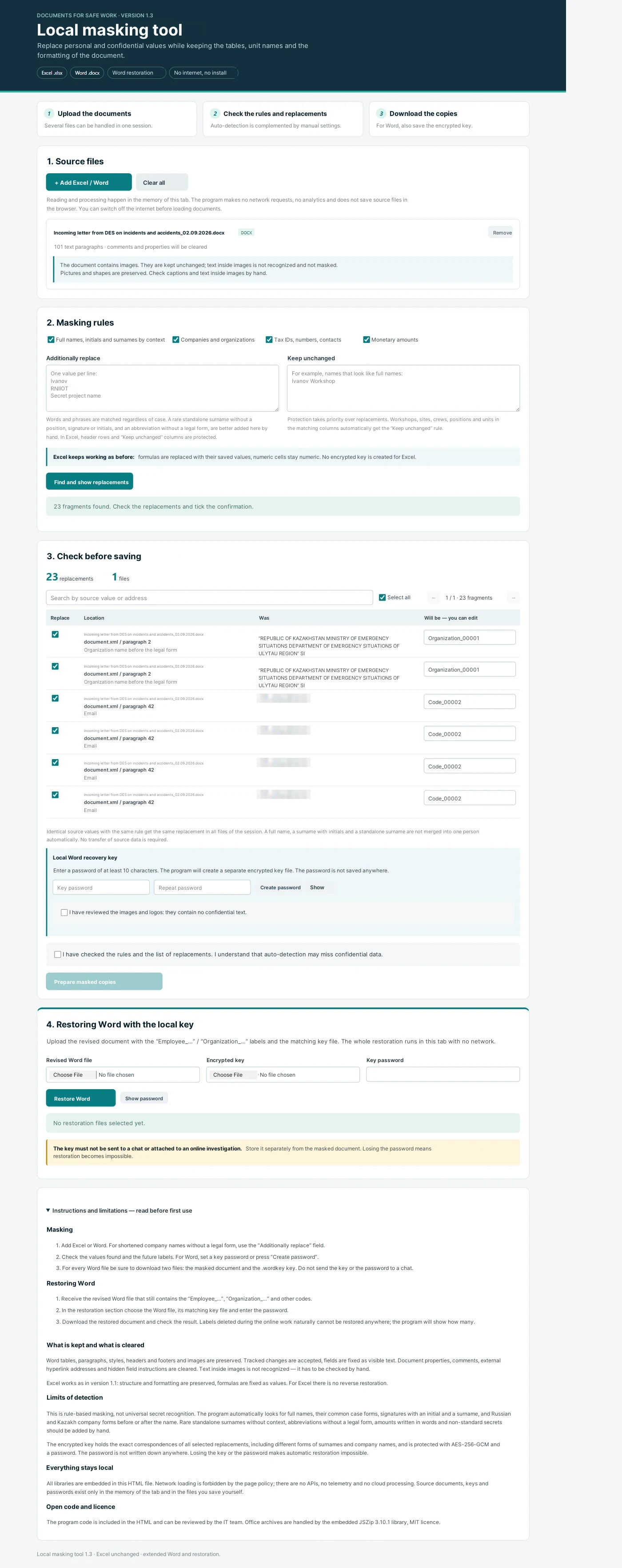
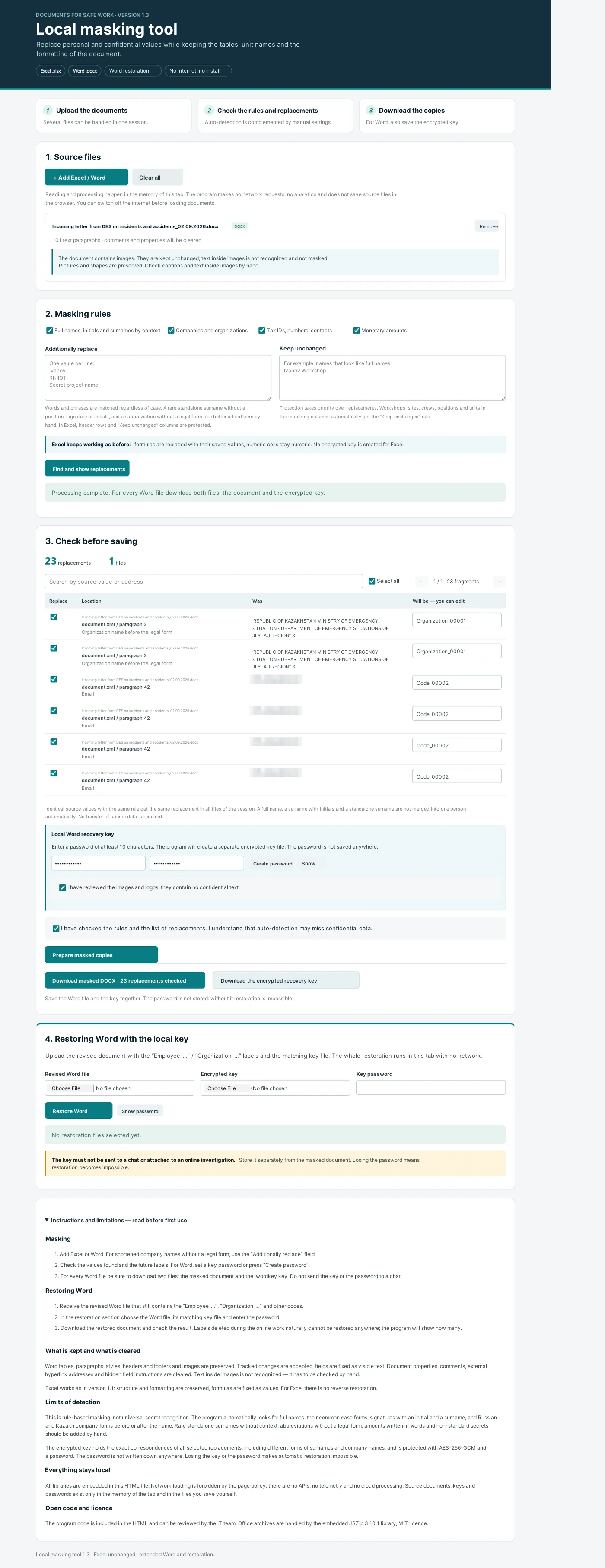
The masker itself was also built with vibe coding. It is important not to treat this approach as the command “make me a program” with the expectation of a perfect result. The working scheme was different: formulate one function, check it, record the defect or the new requirement, and only then move on to the next version.
The first requirement was a single self-contained HTML file with no installation. Then came manual review of the replacements, the “Additionally replace” list, the “Do not change” list, clearing the current session, work with Word, creation of a separate encrypted key and local restoration of the document.
A separate stage was the technical self-check. This time the AI was given not the role of a developer but the role of an auditor of its own code: check fetch, XMLHttpRequest, WebSocket, external libraries, CDNs, APIs, iframes, local storage and other mechanisms through which data could leave the computer or survive after the work is finished. Such an audit does not replace a review by the IT and information-security teams, but it does remove the obvious risks while the prototype is still being built.
The verification request is given in Prompt 4 (see “Ready-made Prompts” at the end of the article).
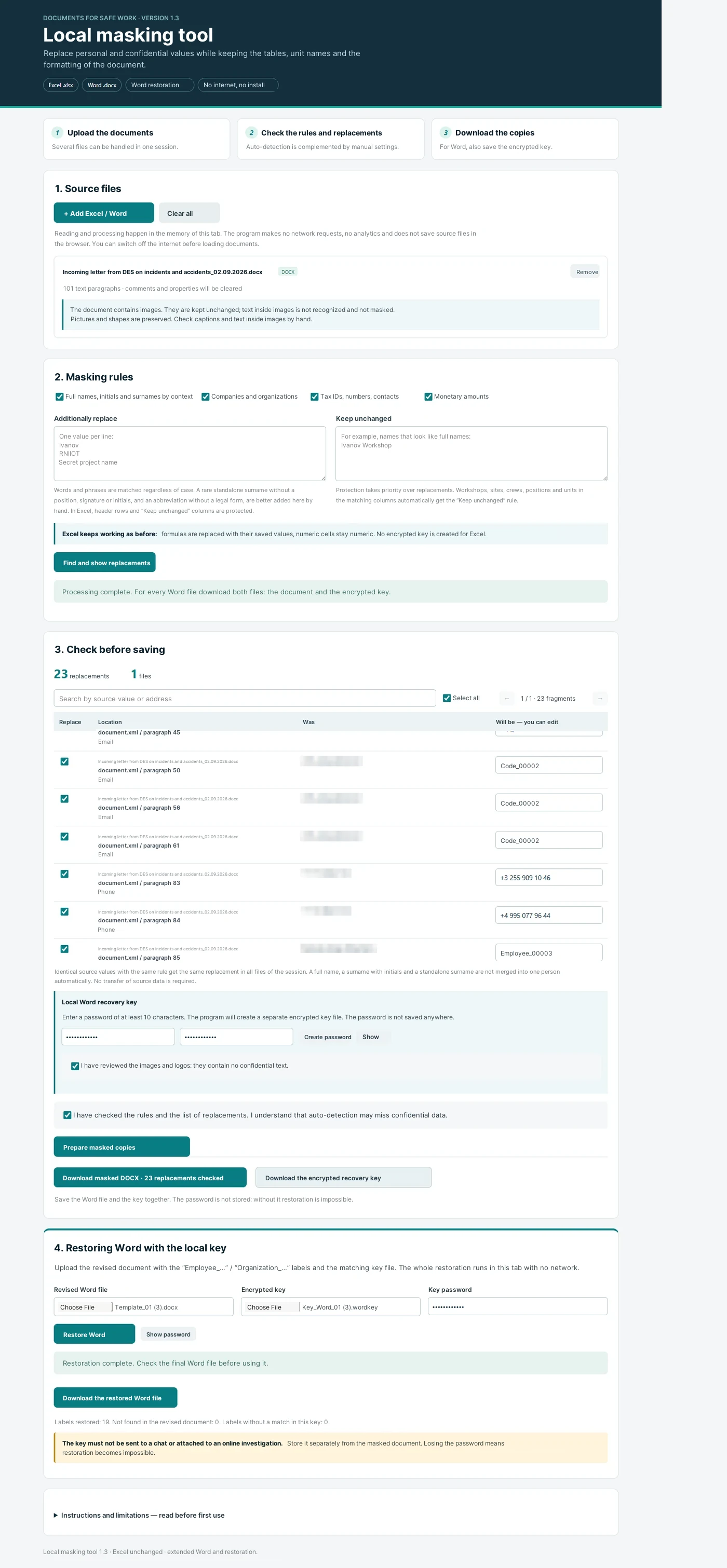
What we get in the end
One local tool covers two different tasks. For Excel it lets you prepare a safe template and, on that basis, build offline analytics over large data sets with AI. For Word it lets you pass incident materials to a cloud AI without disclosing the masked personal values, and then restore the document locally after the analysis.
The key principle stays the same: first exclude from the external perimeter everything the AI does not need to know in order to do the job, and only then use its capabilities.
In the next publications I will show both continuations of this scheme separately: how a standalone HSE dashboard with local loading of the real database is built from the anonymized Excel template, and how an AI agent is used to analyse incident investigation materials.
Ready-made Prompts for building and checking a local Excel/Word masker
The wording is intended for step-by-step development and for adaptation to a specific corporate scenario.
Prompt 1. Basic architecture of a self-contained Excel and Word masker
Create a self-contained local application for masking data in Excel (.xlsx) and Word (.docx).

Application format: a single HTML file that opens in an ordinary browser and works without installing any additional software.

Critical requirements:
1. After it is opened, the application must not access the internet.
2. Do not use external APIs, telemetry, cloud processing or automatic transfer of user files.
3. All required libraries must be embedded in the HTML locally.
4. The user must be able to load one or several Excel/Word files from the computer.
5. Do not modify the source files. Save the result as a separate copy.
6. Perform all operations in the memory of the current browser tab.
7. Add a button that completely clears the current session.

Masking functions:
- find full names, surnames with initials and other selected personal values;
- find organizations and other manually specified values;
- if required, mask numbers, contacts and monetary amounts;
- the same source value must receive the same placeholder label within one session;
- before saving, show the user the list of replacements in the format “location / was / will be”;
- allow any replacement to be switched off or changed by hand;
- add an “Additionally replace” field;
- add a “Keep unchanged” field that takes priority over the replacements.

For Excel, keep the structure of the tables and the fields needed for further analytics. For Word, keep the structure of the document as far as this is possible.

After the first version, list separately the limitations of automatic recognition and the places the user must check manually.
Prompt 2. Excel mode: an anonymized template for vibe coding and HSE analytics
Extend the local HTML masker for safe preparation of an Excel template that can then be used when developing an analytical program with AI.

Goal: the AI must see the structure of the working table but not the real personal and other selected sensitive values.

Requirements:
1. Keep sheet names, column headers, data types, dates, categories and hierarchical attributes unless the user marked them for replacement.
2. Replace full names with stable labels of the form Employee_001, Employee_002 and so on.
3. Replace organizations with labels Organization_001, Organization_002 and so on.
4. Replace identifiers and personnel numbers, if they were selected for masking, with labels ID_001, ID_002 and so on.
5. The same source value must receive the same replacement across all Excel files of the current session.
6. Show a preliminary list of all replacements and let the user correct it by hand.
7. Do not delete rows and columns just because the program does not use them.
8. Do not modify the source file.
9. After processing, allow a separate anonymized copy to be downloaded.
10. Add a prominent warning: before passing the result to an external AI, the user must check the anonymized file manually.

Important: reverse restoration of Excel is not required. The real working database stays inside the corporate perimeter; the anonymized copy is used only to design the logic and the interface of the future HTML dashboard.
Prompt 3. Word mode: masking, a separate key and local restoration
Extend the self-contained HTML masker for two-way work with Word (.docx).

Scenario:
1. The user loads the source Word documents for the incident.
2. The program locally replaces full names, organizations and other selected values with stable placeholder labels.
3. The user reviews and confirms the list of replacements.
4. The program creates:
   a) a masked Word document;
   b) a separate encrypted key file containing the exact correspondences “placeholder label ↔ source value”.
5. For the key file the user sets a password of at least 10 characters. Do not store the password in the application and do not write it into the key in clear text.
6. The masked Word file can then be passed to an external AI agent for content analysis.
7. After receiving the revised Word file the user returns to the local application.
8. For restoration they load:
   - the revised masked Word file;
   - the matching key file;
   - and enter the password.
9. The program locally turns the surviving placeholder labels back into the original values and creates a separate restored Word file.

Security requirements:
- the recovery key and the password must never be transferred over the network automatically;
- keep the key separately from the masked document;
- use modern encryption for the key (for example AES-256-GCM via the Web Crypto API);
- with a wrong password, do not reveal the content of the key;
- after the work is finished, make it possible to clear the current session completely;
- show a warning that placeholder labels which were deleted or substantially changed by the external AI cannot be restored automatically;
- do not recognise text inside images automatically and warn the user explicitly that images and logos have to be checked visually.

Keep the structure of the Word file: paragraphs, tables, styles, headers and footers and images, as far as this is technically possible. Do not modify the source file.
Prompt 4. Technical audit of self-containment and possible leak channels
Perform a technical audit of the HTML application you created as a local offline tool for working with sensitive data.

Check the whole code and list every mechanism found that could create network exchange or long-term storage of the content of user files.

Check separately:
- fetch;
- XMLHttpRequest;
- WebSocket;
- EventSource;
- navigator.sendBeacon;
- external script src;
- external CSS and fonts;
- CDNs;
- external APIs;
- iframes;
- automatic submission of HTML forms;
- Service Worker;
- localStorage;
- sessionStorage;
- IndexedDB;
- cookies;
- external URLs in libraries and code;
- telemetry, analytics and crash reporting.

Required result:
1. The program must work fully with the internet switched off.
2. User Excel/Word files must not be transferred over the network.
3. Recovery keys and passwords must not be sent or stored by the application automatically.
4. If browser local storage is used, explain why; for source data, keys and passwords rule its use out.
5. Add a strict Content-Security-Policy that forbids network connections and embedding of external content as far as this is compatible with the work of the application.
6. After the “Clear everything” command, delete the data of the current session from the state of the application.
7. After the fixes, check the code again and produce a short report: which potential channels were found, what was removed, what remained and why.

Important: state that such a self-check of the code does not replace a corporate IT/information-security review and a legal assessment of whether the specific usage scenario is permissible.
A practical rule: pass only a verified anonymized copy to the external AI environment. The recovery key file and the password must stay inside the local perimeter and must not be attached to the request to the agent.